Conference Speaker Headshots: Hybrid Workflow, 1 to 2 Hour Turnaround
%20(1)%201.png)
.png)
.png)
October 4, 2026
%20(1).jpg)

For conference-scale speaker portraits, run a hybrid program: pre-event remote uploads for confirmed speakers plus an on-site headshot lounge for walk-ups and last-minute additions, or hire a nationwide on-location partner to manage the whole flow. This approach cuts down on chasing busy speakers, keeps every portrait visually consistent, and gets images into your hands faster. Teams like ours build these programs around portable studios and fast turnaround so organizers do not have to improvise logistics on event day.
TL;DR:
- A hybrid program with pre-event uploads and an on-site lounge streamlines speaker headshot collection and maintains visual consistency across all images.
- A portable studio setup requires only a 10 by 10 foot space and staffing ratios of one photographer, one assistant, and one retoucher to ensure smooth operations.
- Securing licensed, high-resolution files and clear consent measures before the event is crucial for legal use and flexibility in publishing images.
- Remote selects from pre-uploaded selfies can be delivered within 1 to 2 hours, enabling timely bios updates before the event begins.
- Cost-saving tactics include sponsorship branding, offering tiered image quality options, and directing more speakers to pre-upload links to reduce on-site workload.
Before booking anyone, settle the basics so your photographer, speakers, and sponsors are working from the same brief.
A few things trip up first-time organizers more than anything else:
Settle these five items early and almost everything downstream, staffing, consent, and delivery, gets easier to manage.
A repeatable headshot station needs less space than most organizers expect: a 10 by 10 foot footprint works for a single photographer setup with a seamless or branded backdrop, a key light, a fill light, and a reflector or second fill to even out shadows. Keep the camera at eye level and a consistent distance from the backdrop so every subject is lit and framed the same way.
Staffing follows a simple ratio for conference volume:
Queue management matters more than gear. Place the station away from the main traffic flow during coffee breaks so it does not create a bottleneck, and schedule VIP or press appointments in short blocks rather than first-come lines. Our conference headshot booth setup guidance covers attendee flow during networking breaks in more detail.
Before the event, confirm venue power access, internet bandwidth for live uploads, and whether your contract or the venue’s requires proof of liability insurance for the production crew.
Pro Tip: Run a five-minute test shoot with venue lighting the morning of the event, screens and ambient light shift color temperature more than most organizers expect.
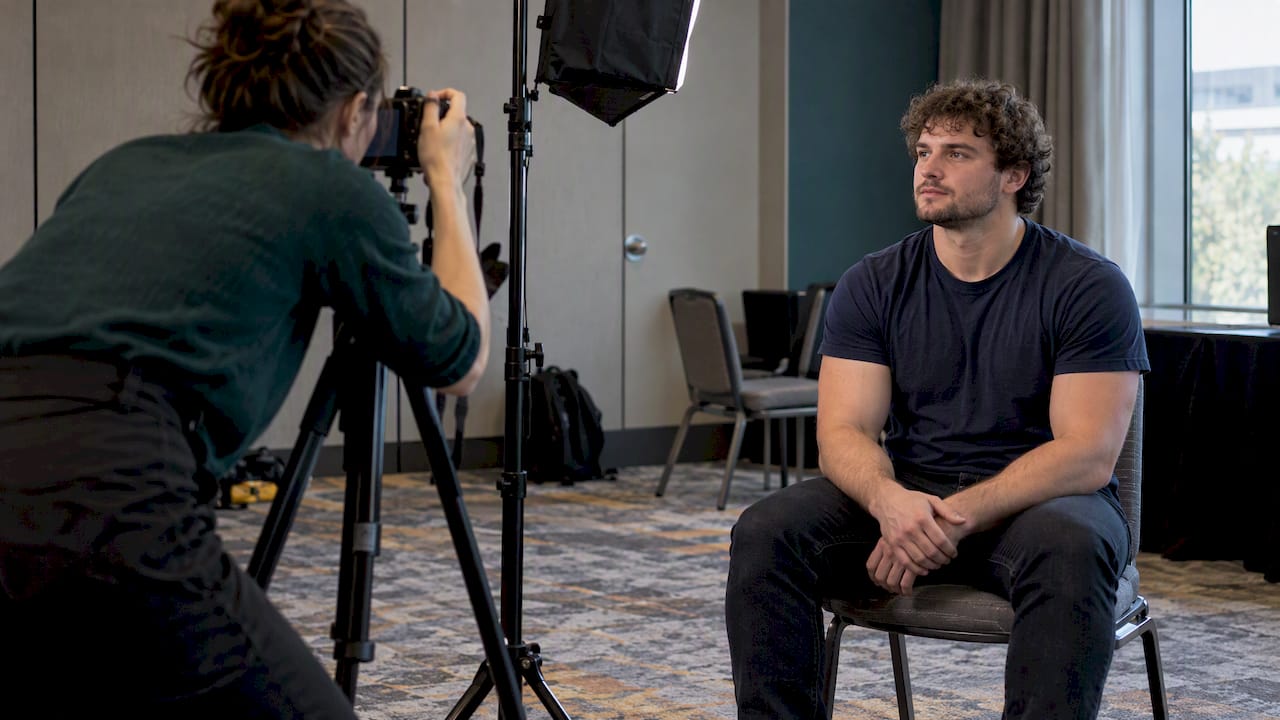
Ticket language alone rarely holds up as sufficient consent. The Association of Corporate Counsel recommends combining ticket notice with conspicuous signage at entry points and an easy, consequence-free opt-out, rather than relying on fine print alone.
Handle these items before day one:
On the day itself:
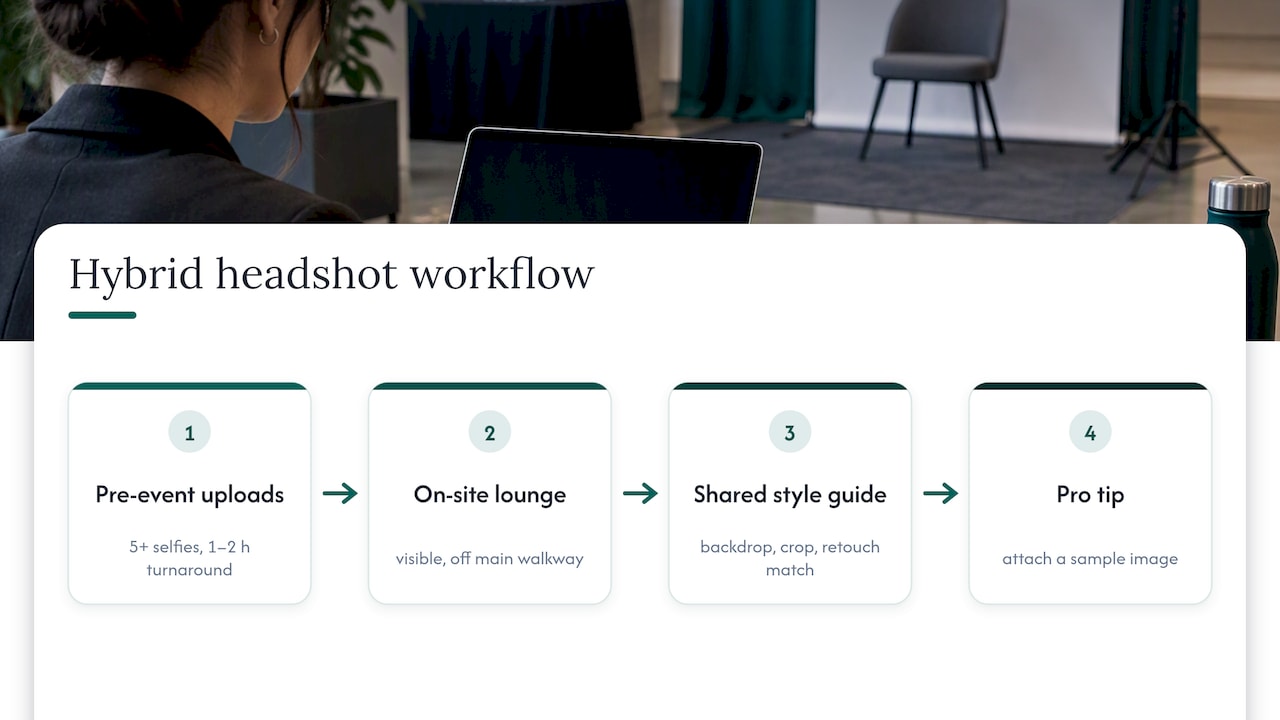
A private upload link sent two to three weeks ahead lets confirmed speakers submit five or more clear selfies along with brief style notes. A skilled retoucher can turn that into a polished, on-brand portrait without ever meeting the speaker in person. According to practitioner benchmarks from Dreamwave, remote-processed selects often come back as a finished gallery within 1 to 2 hours, fast enough to post speaker bios on the event site well before the show opens.
The on-site lounge exists for everyone the upload link missed: last-minute panel additions, press, sponsors, and speakers who never got around to submitting selfies. Position it somewhere visible but out of the main walkway so it catches foot traffic without slowing it down.
The piece that makes both streams look like one program is a shared style guide: same backdrop color or texture, same crop ratio, same retouch intensity, applied whether the source image came from a phone selfie or a studio camera.
Pro Tip: Send the upload link with a sample image attached, speakers who see an example submit better selfies than speakers who just get instructions.
Neutral gray or deep blue backdrops work for most galleries, since they hold up across badges, websites, and social thumbnails without clashing with any one speaker’s outfit. Branded backdrops make sense when the images are purely for the event itself, like sponsor photo walls, but they date quickly once reused elsewhere.
Agree on these specs before the first photo is taken:
Avoid extreme crops that cut off foreheads or chins, keep eye-lines consistent across the gallery, and make sure your photographer is comfortable lighting a full range of skin tones evenly. Our corporate headshot guidelines page covers crop and retouch standards in more depth, and speaker-facing style references like Dot Xero’s speaker resources can help presenters prepare before they arrive.
Crew travel, portable-studio gear, retouching speed, and the number of subjects per hour drive most of the cost in a conference headshot program. More stations or faster turnaround both raise the price.
A few ways to offset or reduce that cost:
Spell out three things in your photography brief: high-resolution master files for archival use, web-sized crops in both square and hero formats, and a gallery organized by speaker name.
Set realistic turnaround expectations in writing:
A fast-turnaround gallery, delivered within 1 to 2 hours of upload, lets organizers post speaker bios while registration is still open rather than after the event starts.
Ask for consistent filename conventions (speaker last name plus session track) and simple rights documentation attached to the delivery so your marketing team knows exactly what it can publish and where. Our same-day headshot selection workflow covers how fast selects move from camera to publish-ready file.
Most organizers treat speaker headshots as a one-time logistics task. We think that undersells what a single shoot can produce. We operate with portable studios built for fast turnaround, which means the same production that fills your speaker bio page can also feed sponsor reports, recruiting pages, and PR outreach without a second shoot. Every project starts with a discovery conversation so the content serves more than one purpose, production stays minimally disruptive to the event itself, and retouching follows one standardized process so a gallery shot in Boston looks identical to one shot in Austin.
— Kevin
A hybrid program, pre-event uploads paired with an on-site lounge, handles the bulk of your speaker roster with minimal chasing. Using a single on-location partner can simplify coordination across a multi-day event.

If you want that managed end to end, here is where to start:
Our conference services page outlines the Networking, Summit, and Conference packages, priced at $2,500, $4,500, and $8,000 respectively, built for exactly this kind of program.
Run a hybrid program: a private upload link for speakers confirmed weeks ahead, combined with an on-site headshot lounge for walk-ups, press, and last-minute additions. Applying one shared style guide, backdrop, crop, and retouch level, across both streams is what keeps the gallery looking like one shoot.
Remote-processed selects from pre-event uploads often return as a finished gallery within 1 to 2 hours, fast enough to publish bios before the event starts. Full retouched galleries from an on-site shoot typically take longer to turn around once editing and quality checks are complete.
Yes. Ticket language alone is usually not enough; the Association of Corporate Counsel recommends pairing it with conspicuous entry signage and a clear opt-out, plus a licensing agreement or work-for-hire clause with your photographer so your organization holds commercial usage rights.
Pricing depends on scope. Studio2U’s conference packages vary in price based on the scope and level of coverage, available on our conference services page.
Yes. Event content strategists recommend giving speakers ready-made promotional assets and social copy, since enabling speakers to self-promote extends an event’s reach well past the days it runs.
