Procurement Ready Same Day Headshot Selection for Corporate Buyers
%20(1)%201.png)
.png)
.png)
September 20, 2026
%20(1).jpg)

Run a tiered hybrid workflow: pro photographers for high-visibility roles, virtual sessions for managers, AI placeholders for volume staff. Pair it with same-day headshot selection through live proofing and a brand approval gate. The result is straightforward: employees pick their final image on-site, and marketing walks away with deployable files inside the agreed turnaround, not a folder of unsorted raws three weeks later.
TL;DR:
- Executives and client-facing roles typically require full professional shoots with same-day selection, retouching, and quick turnaround times within 48 hours.
- Virtual sessions are suitable for managers working across multiple locations, while AI placeholders suffice temporarily for high-volume staff, with replacements scheduled every 12 to 24 months.
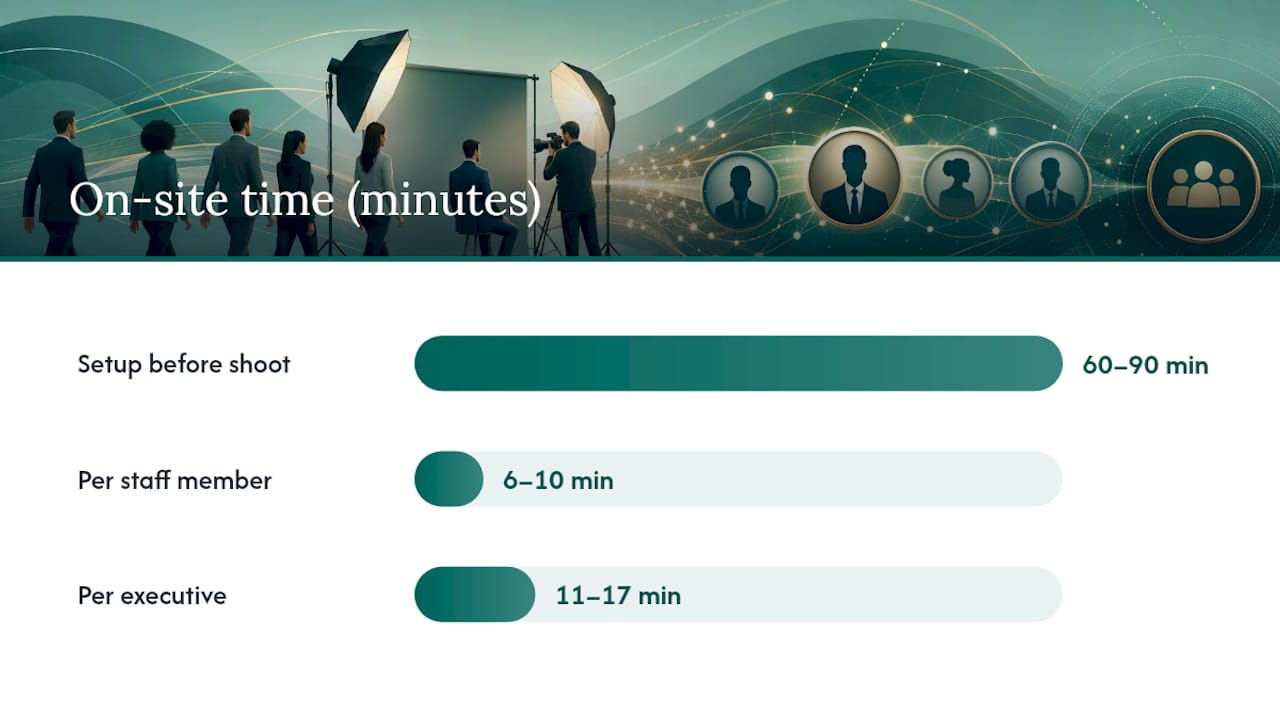
- An efficient on-site shoot schedule includes 3 to 5 minutes per employee for capture and 2 to 3 minutes for live review, with built-in buffers to prevent delays.
- Tethered cameras and live galleries are essential technology tools that enable instant review and help avoid the need for post-shoot proofing.
- A single approver with a standardized checklist ensures consistent branding and avoids approval delays, while proper consent procedures prevent legal issues with external and internal images.
The tiered hybrid model assigns capture methods by role instead of treating every employee the same way. Executives and client-facing leaders get a professional photographer with full lighting and same-day headshot selection tools like tethered live galleries. Managers can often use scheduled virtual sessions. New hires and high-volume staff get an AI-generated placeholder that holds their spot in the directory until a proper shoot happens.
This split exists because a single in-person day rarely covers a distributed company. Roughly [22% of the U.S. workforce works remotely](https://magicstudio.com/blog/corporate-headshots/), and plenty more split time between home and office, which makes a strict “everyone shows up on Tuesday” plan impractical for most organizations larger than a single office.
Here’s how the tiers typically break down:
Replace placeholders on a fixed cycle rather than waiting for complaints. A 12 to 24 month refresh cadence keeps the employee directory from turning into a mismatched timeline of old LinkedIn photos and one good corporate shoot from 2019. Build the placeholder swap into onboarding paperwork so it happens automatically instead of becoming a task someone has to remember.
A same-day selection workflow only works if the schedule is planned in minutes, not vague half-hour blocks. Send a short pre-shoot email at least a week out covering dress guidance, a link to your corporate headshot attire standards, and the exact time slot each person should arrive. Ambiguity here is what causes lines to back up by 10 AM.
A workable on-day sequence looks like this:
A single photographer typically moves through 60 to 80 employees in a full day at that pace, though executives and client-facing staff eat more time per person, so budget accordingly if your leadership team is large.
Pro Tip: Build a 10-minute buffer every 90 minutes into the schedule. Someone always runs late, and that buffer keeps the whole day from sliding by 3 PM.
Standard files typically deliver in five business days; flag anyone who needs a rush file (a departing exec, a press photo deadline) at booking so retouching can prioritize it.
Same-day selection depends on the capture setup, not just the photographer’s skill. A tethered camera connected to a laptop or tablet lets every shot appear on screen in real time, so the subject and photographer can agree on the winning frame before anyone leaves the chair. That single piece of gear is what separates a fast on-site day from one where people leave without knowing which photo made the cut.
Combining these tools only works if everyone captures against the same spec. Loosen that discipline and you get a directory where half the photos look professionally lit and the other half look like a webcam screenshot.
A documented spec sheet is what keeps 40 separate headshots from looking like 40 different photographers took them with 40 different opinions about cropping.
| Spec | Standard |
|---|---|
| Primary aspect ratio | 4:5 (8x10) |
| LinkedIn crop | 1:1, minimum 400x400px |
| Print resolution | 300 DPI |
| File format | JPEG |
| Eye position | 60% down the frame |
| Face coverage | Approximately 60% of frame |
These figures come from a documented corporate headshot spec system built specifically to keep multi-office imagery interchangeable across websites, LinkedIn, and print collateral.
Name files consistently: last name, first initial, department, and date. Keep retouching light: skin evenness and stray hair, nothing that alters bone structure. For cropping guidance for web deployment, match every crop to the same eye line before publishing. Same-day selects deliver as low-res proofs immediately, with full-resolution retouched files following in 48 to 72 hours; standard non-rush jobs run on a five business day cycle.
A single photographer handling one office typically covers 60 to 80 employees in a day; add a second photographer or a second day for anything larger. Executives need more time per person, so if your leadership team is heavy, plan two photographer days even for a 50-person office rather than cramming everyone into one.
Budget line items to plan for:
Directional cost math varies widely by scope. Full multi-office programs for larger organizations have been reported in the low tens of thousands of dollars once travel and retouching are factored in, while shifting volume staff to AI placeholders can meaningfully reduce that total, with some vendors citing savings approaching 90% for high-volume coverage, though image quality trade-offs come with that discount. Model your own numbers against actual headcount and tier mix rather than borrowing someone else’s total.
One person should own the final sign-off. Splitting approval across multiple stakeholders is how a headshot project drags into its third week of email threads.
A single named approver with a fixed checklist is what prevents the common failure mode: three different managers approving slightly different crops, and the website ending up with a visibly inconsistent team page.
Equipment fails. Schedules slip. The fix is having a backup plan decided before the day starts, not improvised at 11 AM with a line of people waiting.
Tethering software crashes more often than photographers like to admit, usually from a driver conflict or a dying laptop battery. Bring a second laptop pre-loaded with the same software and a spare camera battery pack. If the tether genuinely fails, fall back to reviewing shots directly on the camera’s rear screen. It’s smaller and slower, but it keeps same-day selection alive instead of forcing everyone to wait for a mailed proof gallery.
No-shows are the other constant. Build 15% slack into the daily schedule so late arrivals or missed slots don’t cascade through the rest of the day. Keep a rolling waitlist of employees willing to fill a gap if someone cancels, so gaps in the schedule get absorbed rather than wasted.
Lighting problems show up most in offices with mixed window light and fluorescent overheads. Scout the room in advance if possible, and bring a backdrop that can go up in a corner, hallway, or unused conference room. Portable studio setups exist specifically so the shoot doesn’t depend on a building having a good natural-light spot.
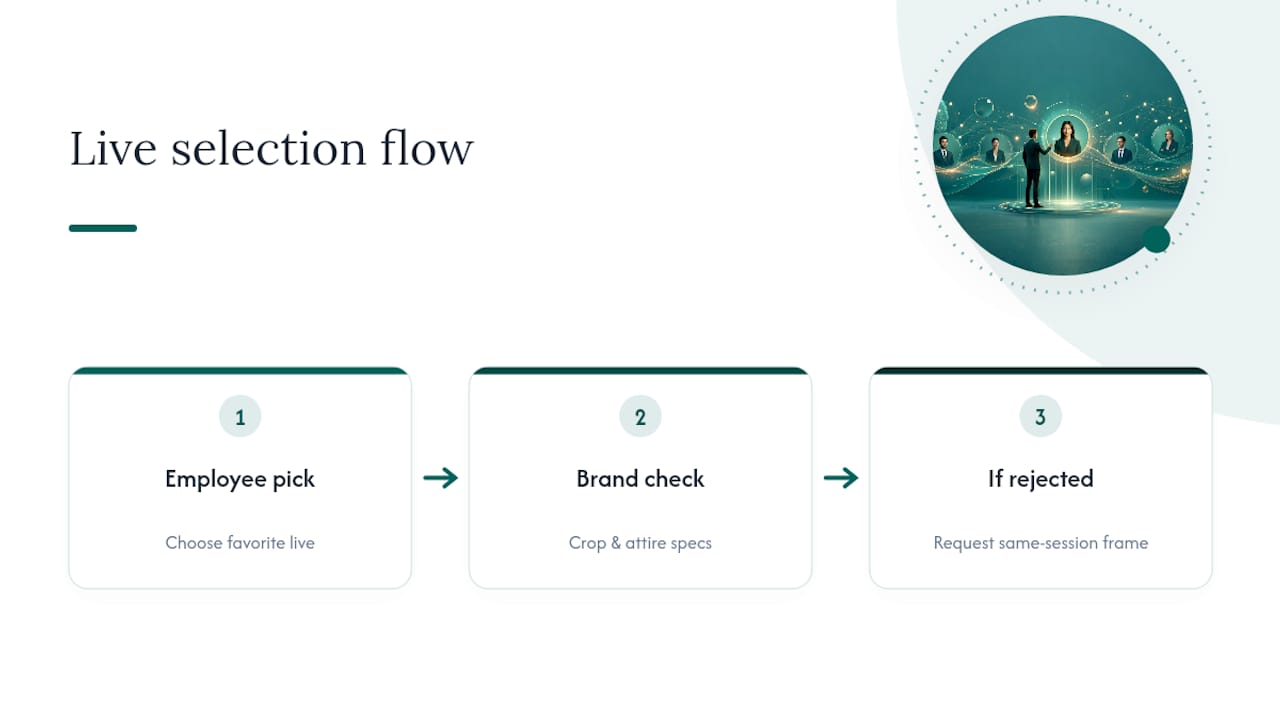
Selection disputes happen occasionally: an employee picks a shot the brand manager later flags for a crop or attire issue. Handle this at the approval gate, not in the room. Let the employee pick their favorite during the live session for morale and speed, then let the single approver catch spec violations afterward and request a substitute frame from the same session rather than a full reshoot. That two-step process keeps the day moving without sacrificing the consistent spec the whole program depends on.
Same-day distribution means an image can hit LinkedIn, a website, and a press kit within hours of being taken, which raises the stakes on getting consent right before the shutter clicks.
Get written or digital consent for commercial use before the shoot day, not during it. A quick e-signature form covering usage rights (internal directory, external marketing, press, social media) should be part of the pre-shoot communication, alongside the attire guidance. Trying to collect signatures in the hallway between subjects slows the line and creates gaps in your paperwork.
Departing employees create a specific problem: if someone leaves the company shortly after their headshot goes live externally, marketing needs a process to pull that image from active use quickly. Build a removal request into offboarding checklists so old photos don’t linger on a website months after someone’s departure.
For contractors, interns, or anyone not a full-time employee, confirm whether their existing agreement covers image usage or whether a separate release is needed. This gets missed constantly at events and conferences where attendee photos get mixed in with staff photos under the same casual assumption of consent.
Finally, if any AI placeholder involves generating or altering a person’s likeness beyond a simple background swap, get explicit sign-off on that specific use. Employees are generally comfortable with an AI-cleaned headshot; they’re far less comfortable finding out later that their face was altered without being told.
The tiered hybrid model works because it matches effort to impact. studio2U builds this into every on-site program through portable studios that minimize office disruption, strategic discovery before the shoot, and fast post-production. The payoff is consistent adoption and brand visuals that hold up across every office, not just the one with the best lighting.
— Kevin
Most in-house teams either overpay for a full professional shoot for every single employee or underdeliver with a patchwork of personal photos and outdated LinkedIn crops. studio2U solves that gap with portable studios brought directly to your office or event, a strategic discovery call before the shoot, and fast post-production so your team leaves with selected, deployable files the same day rather than a slow, unpredictable turnaround.

The START UP package runs $2,500 one-off per shoot and covers exactly this kind of on-site session for growing teams. For multi-office rollouts or ongoing brand consistency work, the STANDARD and ENTERPRISE tiers (from $2,000 and from $3,500 respectively) scale the same workflow across locations. If you’re planning a conference or investor event, the NETWORKING, SUMMIT, and CONFERENCE packages ($2,500, $4,500, and $8,000) build same-day capture directly into your event schedule.
Request a quote for your headshot day and get a proposal built around your headcount, tier mix, and turnaround needs.
Staff typically take 3 to 5 minutes for capture plus 2 to 3 minutes for live review and selection. Executives usually need 8 to 12 minutes of capture time given more poses and wardrobe changes.
Yes. Managers and remote staff can use a scheduled virtual live session with a photographer directing the shot over video, or receive an AI-generated placeholder until their next in-person opportunity. workforce works remotely](https://magicstudio.com/blog/corporate-headshots/). This makes a single on-site day insufficient on its own.
They work well as a temporary directory image for onboarding and high-volume staff coverage, but they’re not a substitute for professional photography on executive or client-facing roles. Most companies pair AI placeholders with a scheduled professional re-shoot every 12 to 24 months.
The START UP package is $2,500 one-off per shoot, while STANDARD and ENTERPRISE packages for larger or multi-office programs start from $2,000 and $3,500 respectively. Event-specific pricing for conferences and summits runs from $2,500 up to $8,000 depending on scope.
Standard delivery uses JPEG files in a 4:5 aspect ratio for primary use, with a 1:1 crop at a minimum of 400x400px for LinkedIn, and 300 DPI resolution for any print application. These documented spec values keep multi-office imagery consistent across every deployment channel.
