Press Release Photo Specs: Size, Format and Captions
%20(1)%201.png)
.png)
.png)
October 21, 2026
%20(1).jpg)

For a standard digital press release, attach a landscape JPG or PNG at 1200 by 630 pixels and under 2 MB as the featured image. Keep a second, larger version of every photo (at least 2400 pixels on the long edge, 3600 if it could run in print) ready to send when an editor asks. Add a caption that names who is pictured, and fill in the file’s metadata. The rest of this guide explains each spec, why it exists and where teams usually get it wrong.
Most people treat the image as decoration. Distribution systems and editors treat it as a requirement.
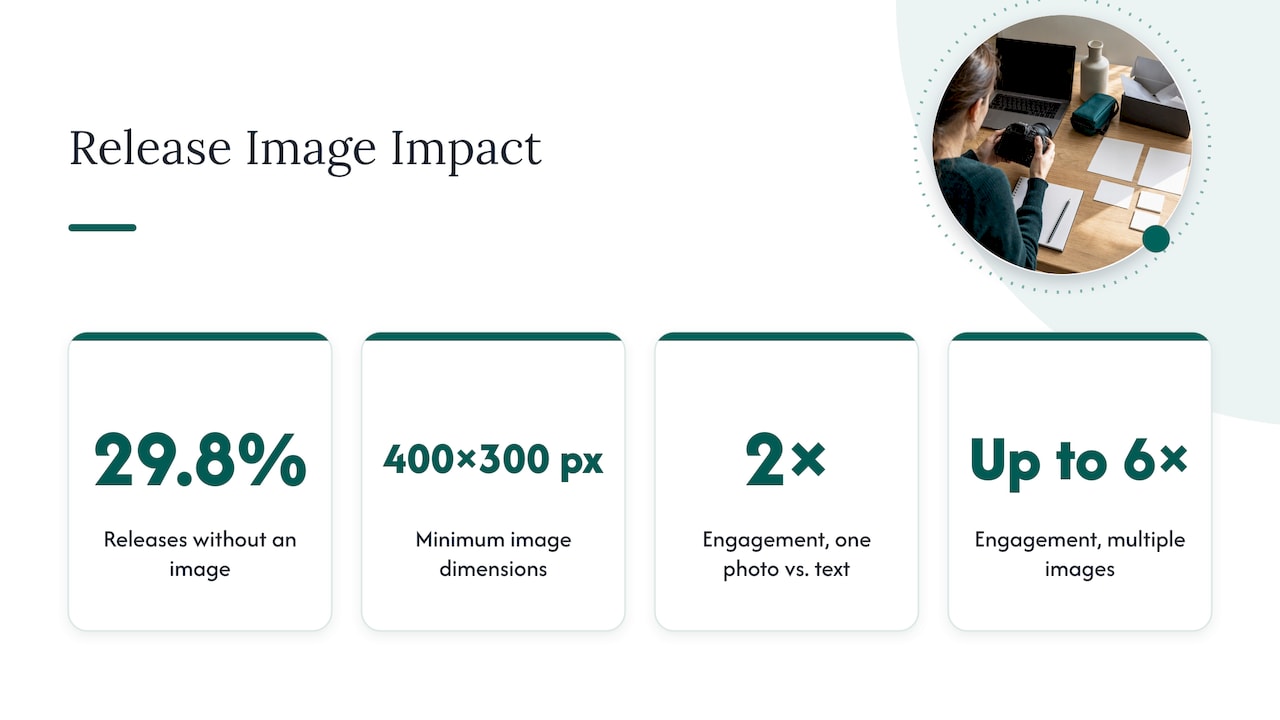
A 2026 analysis reported that 29.8% of press releases go out with no image at all, and that Google News and similar aggregators typically want an attached image of at least 400 by 300 pixels before they include a release in visual feeds. A release with no image, or with an image too small to qualify, can simply fail to appear where readers are looking.
The payoff for getting it right is measurable. PR Newswire’s multimedia guide reports that one photo can double engagement compared with a text-only release, and multiple images can lift it up to six times. The same guide makes a point that matters just as much as the pixel counts: the image should support the story, and low-quality or irrelevant stock photos can hurt credibility and get a release ignored.
So there are two layers to meet. The first is technical: size, format, file weight, metadata. The second is editorial: is this a photo a journalist would trust and want to run? Specs get you through the door. The photo itself gets you published.
| Item | Recommended spec | Why it matters |
|---|---|---|
| Featured (header) image | JPG or PNG, 1200 x 630 px, under 2 MB | Avoids awkward cropping when shared on social platforms |
| Minimum for news aggregators | 400 x 300 px | Below this, a release can be left out of visual news feeds |
| Downloadable original, web | 2400 px or more on the long edge | Newsrooms can shrink big files but can’t upscale small ones |
| Downloadable original, print | 3600 px or more on the long edge | Covers a possible print run |
| Photos per pitch email | No more than four | Link to a cloud folder for larger sets |
| File naming | YYYY-MM-DD_Subject_Variant.jpg | Keeps a shared folder readable |
| Metadata | Headline, caption, credit, copyright notice, object name | Lets the image flow into a CMS without retyping |
Treat the first row as the version that travels with the release and the rows below it as the version that waits in your media folder. Mixing them up is the most common mistake we see: a 6 MB original attached to a wire submission, or a 1200-pixel web file handed to a magazine editor.
This is the size most online submission forms and social previews are built around. It is a landscape frame of roughly 1.9 to 1, and it is the shape that platforms crop least. Vertical images are the ones that get cut off in previews, so if you have a strong portrait-orientation photo, create a separate landscape crop for the release and keep the vertical for your own channels.
Framing matters as much as the pixel count. Leave breathing room around faces and logos, because a platform that trims a few percent from the edges should not decapitate your CEO or slice off your company name.
If your release also lives as a page on your own newsroom, Google’s documentation for news publishers is worth knowing. As summarized by an SEO specialist who covers Google News, the guidance asks for images at least 1200 pixels wide, and for best results several high-resolution versions (at least 800,000 pixels when width and height are multiplied) in 16:9, 4:3 and 1:1 ratios. That is why it pays to export three crops of your hero photo instead of one.
That same write-up notes that these requirements are stated for AMP articles, so treat them as a strong best practice for your own pages rather than a universal rule.
Both, if you can. Use 16:9 for the featured image and wide web placements, 4:3 for many editorial layouts and 1:1 for social tiles and some aggregator thumbnails. Shoot with all three crops in mind: keep the subject centered with margin on every side, and every crop will work.
“Send 300 DPI” is one of the most repeated and most misunderstood instructions in PR. DPI is a print-setting tag, and it says nothing about how much detail the file holds. What newsrooms care about is pixel dimensions. The guidance we’d follow, from a guide on what editors actually want attached, is a minimum of 2400 pixels on the long edge for web publication and at least 3600 pixels for anything that might run in print.
The asymmetry is the reason to err large. A journalist or designer can compress a big file in seconds. Nobody can add detail that was never captured. If an editor has to ask you for a bigger version, you have probably lost the slot to a competitor who sent the right file the first time.
A practical workflow:
JPG is the safe default for photographs. PNG works for logos, screenshots and graphics with flat color or transparency. Keep the featured image under 2 MB. For the high-resolution masters, a larger JPG at high quality is fine, because those go in a download link rather than through a submission form.
A few habits that save trouble:
A good caption lets a busy editor run your photo without a phone call. Newsroom convention is clear on the formula. According to the Associated Press-style guidance in the Multimedia Toolkit, the first sentence describes in the present tense who is pictured and what is happening, and the caption should answer who, what, when, where and why, including the date the image was made. Names go in left-to-right order so nobody is misidentified.
Here is a before and after.
Weak: “Our team at the big announcement!”
Usable: “Maria Lopez, chief executive of Harbor Analytics, center, announces the company’s Series B funding with chief technology officer James Chen, left, and head of sales Priya Nair, right, at the company’s Boston office on Oct. 14, 2026.” (This is an illustrative example, not a real announcement.)
Notice what changed: full names and titles, positions, a place and a date, and a verb in the present tense.
Caption checklist:
Many newsrooms and wire services ingest photo metadata directly into their content systems. That means the text embedded in the file can become the caption and credit that appear on a published page. The guidance in the same JPG.now piece is to populate five IPTC fields: headline, caption, credit, copyright notice and object name, then check with an image-info tool that the values actually stuck after export. Some editing and compression tools quietly strip them.
Two more habits worth adopting:
Editors dislike inbox clutter. The advice from the same guide is to attach no more than four photos per pitch email and to link to an organized cloud folder for anything beyond that. A tidy folder might hold:
When the folder is organized, labeled and consistent, it signals that you’re easy to work with. That alone can tip a decision when two stories compete for the same space.
If your release quotes a person, an editor will probably want a portrait. The specs are the same as above, but the editorial bar is higher: it should be recent, sharp, evenly lit and consistent with how you present the company elsewhere. A headshot from eight years ago, cropped out of a wedding photo, undermines the story you’re telling.
Practical rules for press-ready portraits:
We’ve covered the portrait side in more depth in our guides to PR headshot requirements and what to include in press kit photos. If you’re deciding what a full set of company visuals should contain, our overview of PR and branding photos is the place to start.
Newsrooms hold photos to a standard of truth. The AP’s published principles say its images must always be accurate, and that the news service doesn’t alter or manipulate the content of a photo beyond limited exceptions (see AP’s “Telling the Story” principles). The same section says the AP avoids generic photos or video that could mislead. A company isn’t a news agency, and a posed team portrait is a normal and welcome part of a release. But the standard shapes what editors prefer.
What that means for you:
This is where professional production earns its keep. A photographer who understands editorial expectations will give you frames that look natural, not staged, and that still meet every technical spec.
Your release will be seen as a thumbnail more often than as a full page. Social networks, news aggregators and messaging apps all pull the featured image and crop it to fit. Check three things before you send: the subject is centered with margin, any text in the image is large enough to read at small size, and the page carrying the release has the right preview tags set. If you want help getting those previews right on your own site, this overview of social media marketing for local service businesses is a useful reference on how visuals show up across channels.
We shoot on location for startups, financial firms, accelerators and conferences, and the same pattern repeats. A company closes a round, signs a partnership or makes an acquisition, then scrambles to find a usable photo the night before the announcement. What exists is a cropped phone picture, a headshot from the last conference, and a logo in the wrong format.

Our view is simple. The photo is part of the news, and it should be planned like the news. That means a discovery call before anything is shot, so we know where the images will be used: the wire release, the website, a sales deck, investor updates, recruiting pages. Then we shoot once and export for every use, including the web-sized featured image, the larger originals for editors and the consistent portraits for everyone quoted.
We also think authenticity beats polish for its own sake. Real people in their real offices make better press photos than staged scenes, and editors can tell. Our portable studios come to your office, so leaders step away for a few minutes instead of traveling, and the team looks consistent across locations.
— Kevin
If you’re a marketing or communications lead who needs a full set of press-ready visuals for a team, a funding announcement or an acquisition, we can bring a portable studio to your office. Our on-site shoots include live photo viewing, retouching and a five-day turnaround. Packages published on our site include START UP at $2,500 per shoot and STANDARD from $2,000 per shoot, with a $1,000 branding add-on. For events, see our conference and networking options, or browse all services.
Run through this before you hit send:
For the featured image, use a JPG or PNG at about 1200 by 630 pixels and under 2 MB. Keep larger versions of at least 2400 pixels on the long edge for web, and 3600 for possible print, available for editors to download.
No. DPI is a print tag that doesn’t describe image detail. Newsrooms judge quality by pixel dimensions, so aim for at least 2400 pixels on the long edge for web and 3600 for print, as one editor-focused guide recommends.
Use 16:9 for the featured image and wide placements, and keep 4:3 and 1:1 crops on hand. Google’s news guidance for publishers asks for several aspect ratios, so exporting all three covers most layouts.
Attach no more than four photos to a pitch email. For anything more, share a link to an organized cloud folder with consistently named files and a captions document.
Write in the present tense and answer who, what, when, where and why. Add the date, list names left to right and credit the photographer, following AP caption conventions.
