Portfolio Company Photography: A Guide for PE and VC Teams
%20(1)%201.png)
.png)
.png)
September 19, 2026
%20(1).jpg)

The fastest way to organize employee headshots is short timed slots, an on-site portable studio, live preview with instant selection, and a quick badge or name-card reference photo at the start of each session so files never get mismatched. For teams with 10 or more offices, that means hiring a single vendor with multi-city crews and centralized production so that every location gets consistent lighting, backdrop, and turnaround according to detailed brand guidelines. Done right, a 50-person shoot wraps in one day with zero retouching wasted on rejected shots.
TL;DR:
- Using a badge or name-card reference photo at each session ensures accurate file naming and avoids mismatches in HR systems.
- A centralized project management team and a detailed style guide are crucial for maintaining consistency across multiple offices and locations.
- A live preview and selection workflow reduces post-production time and ensures only approved images are retouched, cutting costs and turnaround.
- Pre-shoot employee guidance on wardrobe and grooming improves photo quality, with clear communication starting 1 to 2 weeks prior.
- Organizing headshot schedules with back-to-back 10-minute slots, buffer periods, and float slots makes the process efficient and adaptable for no-shows or last-minute arrivals.
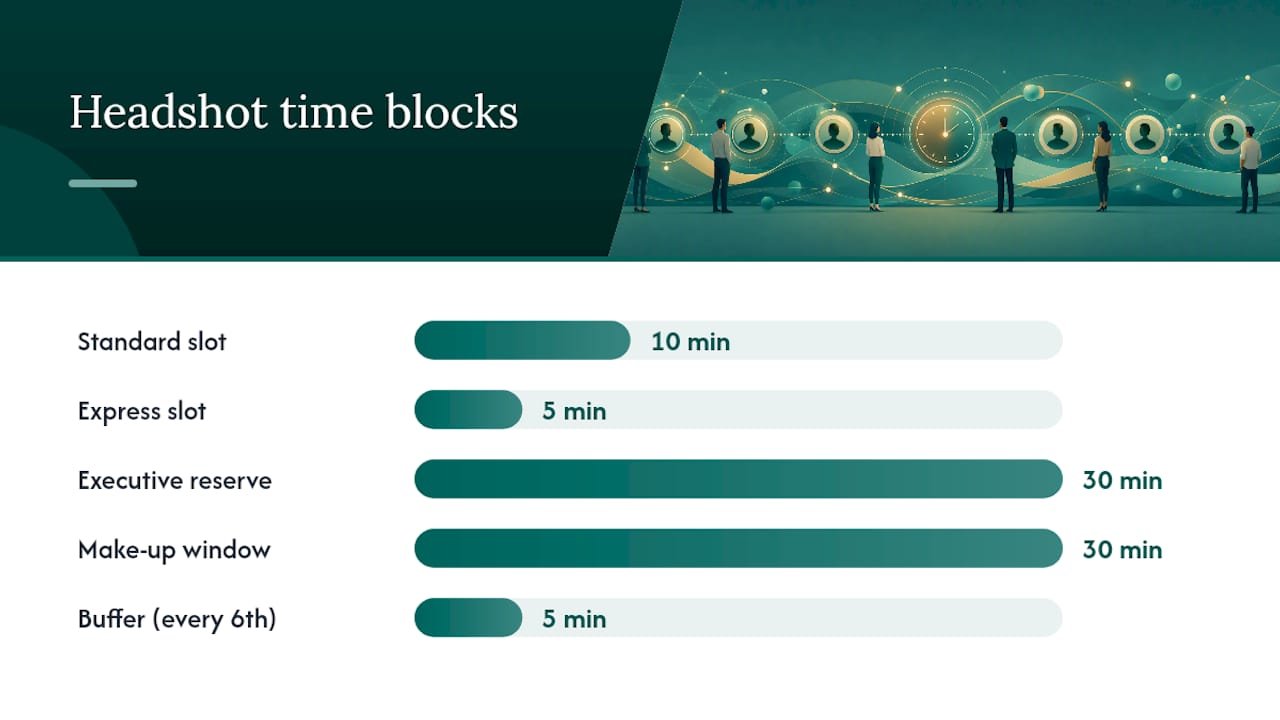
Time-slot planning determines whether your headshot day finishes on schedule or bleeds into overtime. Most photographers move one person through hair check, positioning, and 20 to 30 frames within a short 8 to 10 minute window, so a 10-minute slot works for most staff and a 5-minute “express” slot handles employees who already know their pose and just need updated photos.
For a 25 to 50 person shoot, build the day like this:
Self-book calendar links (a shared sign-up page or a tool like Calendly) tend to outperform assigned schedules because employees pick a slot that fits their day, which cuts no-shows. Assigned schedules work better for large departments where a manager needs everyone accounted for by noon.
Send the invite 3 to 4 weeks out, a reminder one week before, another 48 hours out, and a same-day confirmation with the exact room number. Build in accommodations for remote staff who need a later or virtual option, and always keep a few float slots open. The US Chamber’s guidance on organizing corporate photo shoots makes the same point: logistics planning has to happen before you ever pick a photographer.
A vendor’s gear matters less than its systems. Anyone can bring a camera and a backdrop. What separates a smooth headshot day from a chaotic one is whether the vendor has run this exact process dozens of times across different office layouts.
Require these capabilities before signing anything:
On the discovery call, ask directly: What file formats and sizes do you deliver? What’s your retouch policy, meaning does everyone get light retouching by default or only on request? How do you handle data security for employee images? Can you share a sample run sheet from a past shoot?
Pro Tip: Ask to see an actual run sheet from a past multi-office shoot, not a sales deck. If a vendor can’t produce one, they probably haven’t run a program at this scale before.
A vendor without a live-selection process is a red flag on its own, since it means every frame from every employee goes into retouching, tripling your post-production bill and turnaround time. Vague answers about file naming or matching are the second red flag.
Employees show up looking their best when you give them specific, not generic, guidance. “Dress professionally” means five different things to five different people. A two-column checklist removes the guesswork.
Send a short email 1 to 2 weeks before the shoot with:
Attach a one-page PDF covering the same points plus a note for remote employees on how to book a separate virtual session or visit a satellite office. For contractors or last-minute hires, keep two or three float slots per day specifically unassigned. A short FAQ block on the booking page itself, covering things like “what if I’m running late” or “can I reschedule,” cuts down same-day questions to the front-desk coordinator.
The room setup matters more than most planners expect. You need roughly a 10 by 12 foot space, two dedicated power outlets, a backdrop that doesn’t cast shadows from overhead lighting, and clear signage directing people from the elevator or lobby to the check-in table.
Run the session like this:
Pro Tip: Assign one team member solely to managing the check-in line and badge photos. Splitting that job from the photographer keeps the actual shooting cadence from stalling.
Common snags: glasses glare (have a no-glare backup pair on hand), a missed capture where the reference photo didn’t save, and people who show up without their badge, in which case a printed name card works as well. Build two rebook slots into every session for exactly these cases.
File naming is where most headshot programs quietly fall apart weeks after the shoot, once someone in HR realizes 200 files sit in a folder with camera-generated names like “IMG_4021.jpg” and no way to tell who’s who.
Fix this at the source. Rename every selected file using a consistent pattern such as employeeID_lastname_firstname.jpg. The badge or name-card reference frame taken at the start of each session makes this process easier, as the retoucher or post-production coordinator can confirm the identity before renaming the final selected images. Keep capture metadata (timestamp, camera ID) intact in case you need to trace a file back to its original session later.
Build your CSV import file with a primary-flag column marking which image is the official directory photo versus a secondary or alternate crop.
Before you bulk upload:
Testing a small batch first isn’t optional caution, it’s the difference between catching a mapping error on 15 files versus discovering it after 400 employee photos load under the wrong names.
Multi-office and M&A headshot programs fail for one reason more than any other: no single source of truth for who counts as an employee and what their correct ID is. Fix that before booking a single photographer.
Budget and timeline vary by office size, but a single coordinator tracking all locations catches inconsistent lighting or backdrop choices before they reach 10 different retouched batches that don’t match.
The camera and lighting kit are the easy part. What actually determines whether a headshot program scales cleanly across one office or fifteen is the system behind it: how slots get booked, how files get matched to names, and how fast retouched images come back. Most breakdowns happen in that plumbing, not in front of the lens.
The badge-reference trick alone solves a problem that quietly derails most in-house attempts at scale. Without it, someone in HR is guessing which face matches which name from a folder of 300 unlabeled files. With it, that same task takes minutes.
That’s why I keep pointing HR and marketing leaders toward standardized production systems and centralized post-production rather than a patchwork of local freelance photographers. Consistency compounds. A logo crop that’s off by a few pixels in one office is a rounding error. The same error repeated across ten offices is a brand problem someone eventually has to fix by rebooking everyone.
— Kevin
Some vendors run on-site headshot days with portable studios, live preview and selection, and a badge or name-card reference workflow built into every session, so you’re not stuck matching 300 unlabeled files after the fact. For companies with multiple offices, some photography providers coordinate crews across cities under one centralized production team, helping to keep lighting, backdrop, and turnaround consistent whether you’re shooting one location or many.

If you’re planning a first headshot day for a smaller team, the START UP package is built for exactly that. Larger or multi-office programs fit better under the branding and enterprise options, which scale with team size and shoot frequency. Request a sample run sheet or book a discovery call to see how your next headshot day could look before you commit to a date.
It refers to the practice of capturing 20 to 30 frames per person during a session to guarantee a handful of genuinely usable options. Best-practice headshot guides recommend this range because expressions and micro-movements vary too much to rely on just a few shots.
Busy patterns, logos, and stark white (if the backdrop is also light) tend to distract from the face or wash out against the background. Solid, mid-tone colors near the collar photograph best, according to professional headshot guidance.
AI-generated headshots can produce a usable placeholder image, but they don’t match a real photographer’s ability to capture natural expression, correct lighting, and brand-consistent backdrops across an entire team. For company-wide programs, a live photo session with immediate selection still produces more consistent, authentic results than AI generation alone.
The biggest ones are skipping a live-preview and selection step (which sends every frame to retouching instead of just the chosen ones), failing to standardize lighting and backdrop across offices, and not using a badge or name-card reference photo to keep file matching accurate.
Pricing depends on team size and shoot frequency; studio2U’s current packages and exact pricing are listed on its headshot services page.
