Standardize Executive Headshot Styles for HR and Branding Teams
%20(1)%201.png)
.png)
.png)
September 30, 2026
%20(1).jpg)

The fastest reliable way to get consistent hybrid team headshots is a mixed capture program: hub days or standing sessions for people who come into an office, guided remote capture for fully distributed staff, all governed by one style spec. Start by finalizing a one-page style brief and recruiting a pilot group of 20 to 50 people. A professional provider can run this end to end, or your team can manage it internally.
TL;DR:
- Consistent headshot styles require strict control over background, framing, and pose, regardless of whether photos are taken in-office or remotely.
- Using a mix of hub days, standing sessions, and guided remote capture allows coverage for all employee locations while maintaining style uniformity.
- Locking down six key variables—background, lighting, lens, framing, wardrobe, and post-processing—is essential for visual consistency across all images.
- Administrative tasks such as consent, QA, and file organization often take comparable time to the actual photography process, impacting overall project costs.
- Vendors typically charge around $2,500 per shoot for smaller teams, with costs influenced mainly by logistics, retouching, and number of sessions needed.
Most inconsistency in team headshot galleries traces back to a handful of visual mismatches, not bad photography. Different offices use different walls as backdrops. Employees crop their own remote photos at different distances. Poses range from stiff to slouched because nobody defined a standard. Some staff show up on a company laptop camera, others on a phone held at an odd angle, and the resulting gallery looks like it was assembled from five different companies.
Coordination adds a second layer of difficulty. Distributed staff span time zones, travel budgets rarely stretch to fly someone in just for a photo, and staggered hiring means new employees trickle in outside of any planned shoot window. The result is a headshot page that gets patched every quarter instead of built once and maintained.
Visual perception research offers a useful shortcut here: people judge portrait consistency mainly by crop, background, and framing, not lighting. That means you do not need identical studio lighting in every office to look unified. You need the same background color, the same crop ratio, and the same framing rules applied everywhere.
Workforce patterns make this a permanent planning problem rather than a one-time cleanup. The Bureau of Labor Statistics tracks ongoing flexible and remote work arrangements across the labor market, which means any company with a distributed headcount needs a repeatable process, not a single photo day.
The drivers worth fixing first, in order of visual impact:
Three operational methods cover almost every hybrid workforce, and most companies end up using a combination rather than picking just one.
Hub days work best for dense office locations and executive groups where a dozen or more people are on-site the same day. The logistics are simple to plan (one location, one crew, one day) but the per-person cost only makes sense when enough people show up to justify travel and setup time.
Standing sessions solve the staggered-hire problem. Instead of waiting a year for the next company-wide shoot, an employee who starts in March gets photographed at the next scheduled sitting, which might be six weeks out instead of eleven months. This model works well for offices with predictable in-person days but light daily headcount.
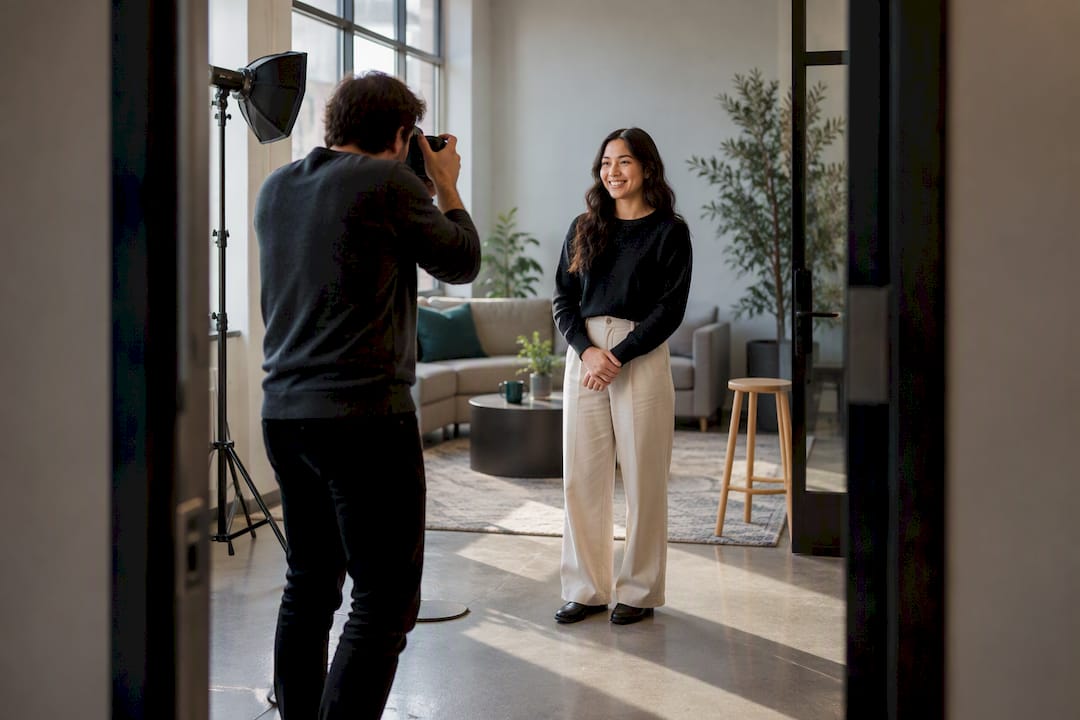
Guided remote capture is the only realistic option for employees who never see an office. Live-directed sessions, where a photographer coaches someone through a video call in real time, produce more consistent results than fully async submissions, but they take longer per person and require decent home lighting. Async capture against a published standard scales faster but needs a tighter QA process to catch bad crops, harsh shadows, or off-spec backgrounds before they reach the final gallery.
Combining methods preserves one company look as long as the style spec, not the capture method, defines the output. A few practical rules:
A style spec is the single document that keeps a hub-day photo, a standing-session photo, and a remote photo looking like they came from the same shoot. Six variables matter more than anything else.
Studio2U’s corporate headshot guidelines and retouching policy are useful references when drafting background, framing, and retouch limits from scratch.
Pro Tip: Lock the background and crop before worrying about lighting: those two variables drive perceived consistency more than anything else.
Assigning employees to a capture bucket goes faster with a short rule set than with a case-by-case debate. Four criteria cover almost every situation: how many days a person spends in an office, how visible their role is externally (executives, sales, recruiting-facing staff), whether travel to a hub is realistic, and whether the role carries security or compliance restrictions on image use.
A sample rule set that most companies can adopt immediately:
Contractors and vendors generally fall outside a headshot program unless they appear in external marketing, in which case they follow the same remote-capture path as employees. Recent hires should never be excluded for administrative convenience: a placeholder photo or missing headshot on a public team page is its own consistency problem. Privacy opt-outs need a clear, documented path, since HR/legal teams typically want a signed record showing participation was voluntary rather than assumed.
A pilot of 20 to 50 people typically runs two to four weeks from style-brief sign-off to finished, retouched photos, enough to test the spec against real lighting conditions and real home setups before committing to a full rollout. Hub days usually deliver a full office’s finished photos within the agreed turnaround window a vendor commits to; guided remote capture takes longer per person because of scheduling and QA passes, but scales without travel costs.
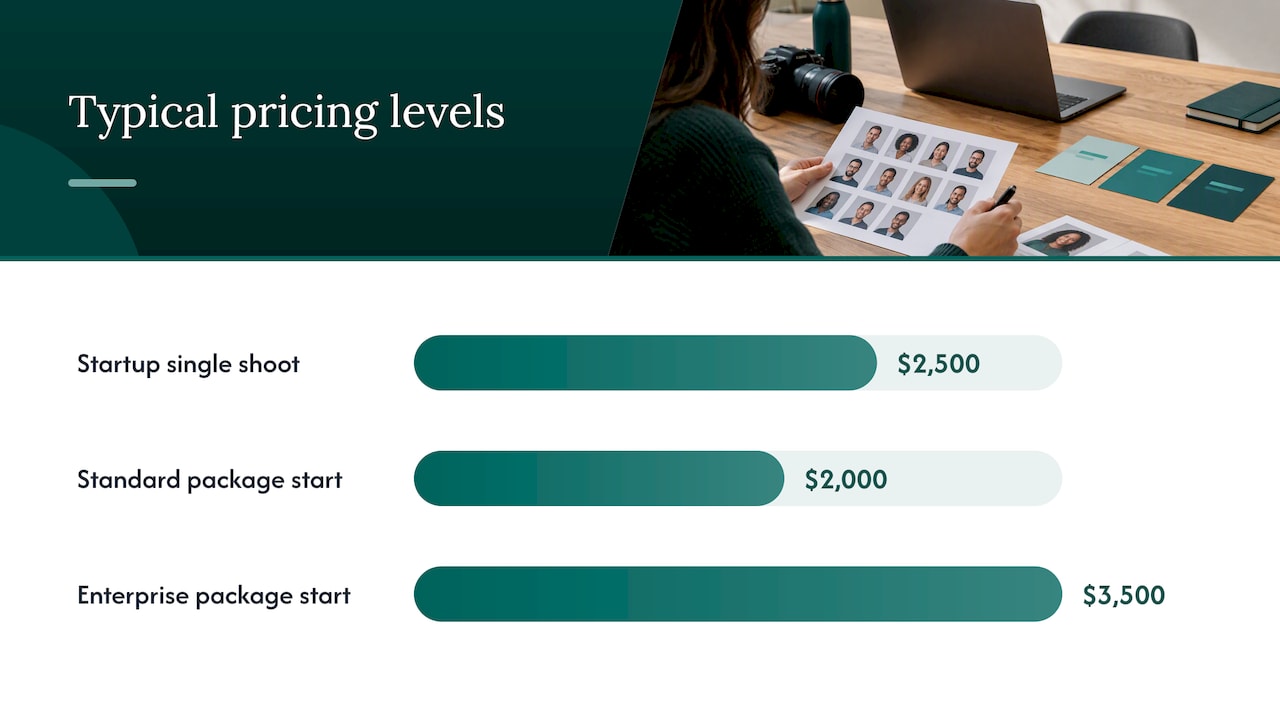
Pricing shapes vary by method rather than by headcount alone. A single on-location shoot for a startup-sized team runs $2,500 as a flat per-shoot fee, while larger branding programs across multiple offices start at $2,000 for standard packages and $3,500 for enterprise-level engagements. What drives the per-person cost within any package is mostly logistics: travel to multiple locations, the number of standing sessions needed to catch stragglers, and how much retouching time each image requires.
Administrative time is the cost most planners underestimate: scheduling volunteers, collecting consent, running QA on remote submissions, and ingesting files into a shared library often takes as long as the actual photography.
Studio2U’s guides on organizing employee headshots and running company-wide headshot programs cover file naming and multi-office scheduling in more detail.
Pro Tip: Publish a small internal gallery for stakeholder sign-off before updating the public website: it catches spec violations while they are still cheap to fix.
A photograph can become biometric data once it is processed into a facial template, which is why AI-generated or AI-enhanced headshots draw more legal scrutiny than a standard photo shoot. Coverage of this issue notes that state laws vary in scope, and enforcement differs by jurisdiction, with biometric privacy statutes in some states and separate obligations under GDPR for any international staff. Treat any vendor handling AI processing as a biometric-data processor until they say otherwise in writing.
Before signing with any vendor, insist on a documented consent record, a stated deletion SLA, an explicit no-training clause covering your employees’ images, and a subprocessors list. A 20 to 50 person volunteer pilot also gives HR and legal a documented record that participation was voluntary, which matters if the program later expands company-wide.
Coordinating headshots across a dozen offices and a remote workforce is a logistics problem before it is a photography problem. Some providers run these programs with portable studios that travel to client offices, which keeps disruption low and lets a hub day happen in a conference room instead of a rented studio. Fast post-production turnaround matters just as much: a finished gallery that sits in editing for weeks loses momentum with the stakeholders who requested it in the first place.
Pilots typically start with a short discovery call to confirm the six-variable spec, then a small volunteer group tests it against real office lighting before a full rollout gets scheduled. Consistency comes from applying that same spec across every hub day, standing session, and remote capture, not from matching equipment location by location.
— Kevin
Building a mixed capture program in-house means managing photographers, remote-capture instructions, retouching standards, and file delivery all at once. Studio2U handles that as one engagement: on-location hub days at your offices, standing sessions for staggered hires, and a consistent retouching and export pipeline so a photo taken in one city matches one taken in another.

Pricing runs $2,500 per shoot for a startup-sized team, with branding-level programs across multiple offices available through standard and enterprise packages. Teams presenting headshots inside investor decks or sales materials sometimes also use tools like Quikturn to manage how those visual assets get packaged for external audiences. If your team is planning a pilot, visit the Studio2U headshots page to see current packages and book a discovery call.
Avoid busy patterns, loud logos other than your company’s, and very bright or very dark colors that clash with your chosen background. Solid, mid-tone clothing with a visible collar or neckline photographs consistently across different lighting setups.
A hybrid team combines employees who work from a shared office some or all of the time with employees who work remotely full time. This mix is why headshot programs need more than one capture method to reach everyone consistently.
General AI image tools can generate a stylized portrait, but they are not the same as a photographed headshot and can raise biometric-data and consent questions when used for corporate profiles. Companies building an official team page typically rely on a photographed and retouched image instead, following a documented vendor and privacy checklist.
Pricing depends heavily on format: a single-shoot startup package runs $2,500 flat, while multi-office branding programs start at $2,000 for standard and $3,500 for enterprise packages. Cost is driven mainly by travel logistics, number of sessions needed, and retouching time rather than headcount alone.
