Standardize Executive Headshot Styles for HR and Branding Teams
%20(1)%201.png)
.png)
.png)
October 1, 2026
%20(1).jpg)

You can sometimes get a finished headshot the same day, but most professionals deliver within 24 hours to two weeks depending on the workflow. Tethered capture and live proofing sessions produce the fastest results, while the biggest delays almost always come from slow client selection and unclear revision requests rather than the editing itself.
TL;DR:
- Most headshot deliveries are completed within 24 hours to two weeks, depending on session type, size, and client approval speed.
- Client review delays, especially slow approval or unclear feedback, are the main cause of schedule slippage, not the editing process itself.
- Using real-time tethered capture and limiting revisions can significantly reduce turnaround time.
- Rush services often limit the number of images or reduce retouching complexity, increasing costs and decreasing deliverables.
- Clear, pre-agreed deadlines and a single approver streamline approval stages and prevent avoidable delays.
How long you wait for finished headshots depends heavily on who is being photographed and how many people are involved. A solo virtual headshot session, where a photographer shoots you over video and edits from a still frame or short capture, often comes with a 24-hour delivery promise. In practice, 48 hours is more realistic once you account for review time and any requested touch-ups.
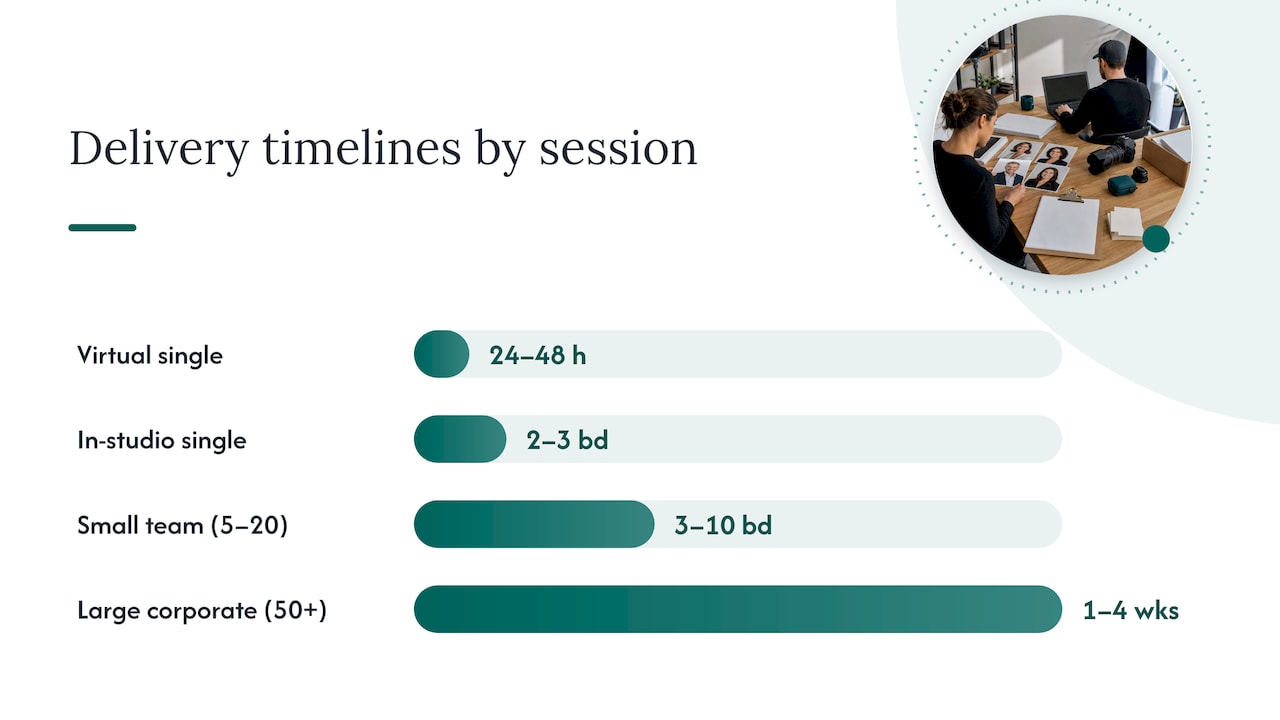
In-studio single headshots typically take longer because the file sizes are larger and the retouching is more detailed. Expect 2 to 3 business days for a straightforward edit, stretching to 1 to 2 weeks if the retouching involves more complex skin work or multiple outfit changes.
Small teams and larger rollouts follow a different rhythm entirely:
Large projects aren’t slower because the editing takes longer per photo. They’re slower because scheduling, culling, and sign-off all multiply with every added subject, and studios batch the work to keep quality consistent across hundreds of images.
Turnaround time is really five separate stages stacked together, and knowing where the time goes helps you spot where it can be trimmed.
Each stage adds time on its own, but the selection stage is the one most within your control, and it’s also the one most likely to stall a project.
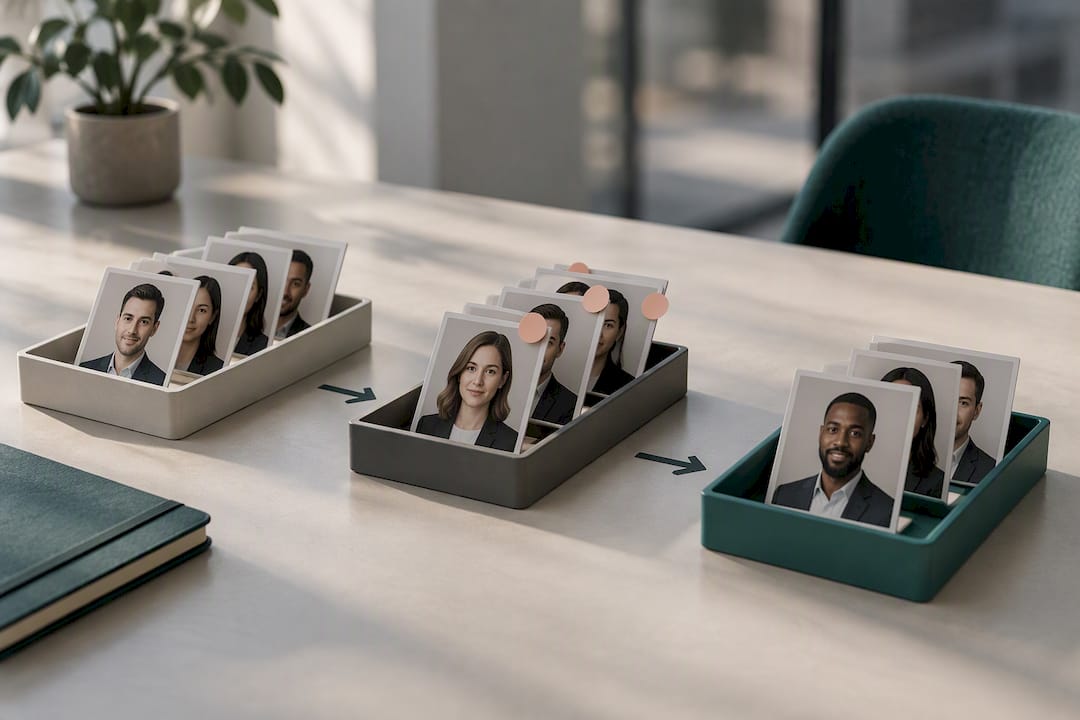
The proof gallery exists to protect the photographer’s work and give you a low-stakes way to choose favorites before anyone invests time in full retouching. Proofs are deliberately low-resolution and watermarked, and studios ask for a formal sign-off before deep editing begins, according to proofing best practices. That sign-off step is also where projects tend to lose the most time.
Photographers report that slow client selection is the single most common reason a delivery window slips, more so than any editing bottleneck, based on industry guidance on approval delays. A few practices consistently prevent this:
Pro Tip: Put the selection deadline in the booking confirmation, not just the delivery email. Deadlines mentioned after the shoot get missed far more often than ones agreed to in advance.
Expedited delivery is real, but it comes with limits that aren’t always obvious upfront. Same-day and 24-hour rush options typically cap the number of final images and simplify the retouching to natural color correction rather than detailed beauty work. Photographers commonly charge for rush service in one of a few ways:
The trade-off is usually fewer images, lighter editing, or both, since heavy retouching on a close-up portrait can take up to two hours per image depending on complexity. If you need one clean headshot for a LinkedIn update by tomorrow, rush service makes sense. If you’re outfitting an entire team for a rebrand, planning around a normal timeline almost always produces better and more consistent results.
Most delays are avoidable with a bit of upfront planning, whether you’re booking one photo or coordinating a hundred.
Pro Tip: Send a one-line wardrobe guideline to every participant before a team shoot. It prevents the on-site delays that come from last-minute outfit changes or color clashes.
Studio2U runs on portable studio setups that travel directly to a client’s office, event, or multiple locations, which removes the scheduling friction of getting everyone to a single studio address. Standardized editing pipelines mean every project, whether it’s five headshots or five hundred, moves through the same retouching and export process rather than being handled ad hoc.
A few operational habits make this consistent:
This kind of standardization is what makes a five-day turnaround achievable across dozens or hundreds of subjects, not just a single portrait.
The conventional advice on turnaround time focuses almost entirely on the photographer, as if editing speed were the bottleneck. It rarely is. The real lever is how quickly you make decisions after the shoot ends. A photographer can deliver proofs in a day, but if the approval sits in someone’s inbox for two weeks, the “fast” workflow accomplishes nothing.
What’s underrated is how much a single upfront decision, naming one approver instead of a committee, changes the entire timeline. What’s overrated is chasing the fastest advertised delivery window without checking what gets cut to hit it, since rush tiers often mean fewer images and simpler edits. High-quality headshots matter because split-second impressions of a face shape how people judge character, according to research from Princeton University. That’s a reason to protect retouching quality, not rush past it. If you take one thing from this, prioritize a clear selection deadline and a named approver before you worry about which studio promises the fastest hours.
— Kevin

Instead of guessing at a delivery window, Studio2U builds one into the project from the start. A discovery call before the shoot covers deliverables, a named approver, and a documented deadline, so the timeline isn’t a hope, it’s part of the agreement. Individuals and small teams typically fit the START UP package at $2,500 per shoot, while organizations coordinating multiple offices or larger rollouts usually look at the STANDARD or ENTERPRISE branding packages, starting from $2,000 and $3,500 respectively, with a $1,000 branding add-on available. Companies running conferences or networking events can use the event photography packages, covering networking sessions, summits, and full conferences. Whichever package fits, ask for the delivery window in writing before the shoot date is confirmed.
For more on proofing and approval workflows, see Aftershoot’s guidance on sending proofs and approval process guidance. On why polished, natural-looking images matter, see Getty Images’ consumer research and Robert Half’s LinkedIn profile research. For structured approval tools, see Contentelli’s client approval workflow guide.
Most photographers deliver within 24 hours for simple virtual sessions and 2 to 3 business days for standard in-studio edits. Larger teams and corporate rollouts typically take 3 to 10 business days, or up to several weeks when delivery is phased across departments.
Tethered capture with live culling during the session is the fastest workflow, since favorites are chosen in real time instead of during a separate review stage afterward. Same-day or 24-hour rush tiers are also common, though they usually mean fewer final images and simpler retouching.
Client-side delays in reviewing and approving proofs are the most common cause of missed delivery windows, more often than editing itself, according to industry approval-process research. Naming a single approver and setting a firm selection deadline before the shoot prevents most of these delays.
Yes, expedited delivery is typically priced as a flat rush fee, a per-image premium, or a packaged expedited tier with a set number of images. The trade-off is usually a lower image count or lighter retouching compared to a standard timeline.
Avoid busy patterns, very bright or neon colors, and pure white or black, since all three can distract from your face or cause exposure problems during editing. Solid, muted colors in the mid-tone range tend to photograph best and require less color correction, which also helps keep editing time down.
