Consistent Finance Headshot Style for CFOs, Advisors and Teams
%20(1)%201.png)
.png)
.png)
July 31, 2026
%20(1).jpg)

The most effective employer brand video you can make right now is a culture-driven hero film built around unscripted employee voices, paired with shorter social cutdowns for LinkedIn and Instagram Reels. That combination gives you a careers-page anchor, paid social fuel, and organic content from a single half-day shoot.
Before you brief anyone, lock in these five elements:
Your immediate next step: schedule a 30-minute stakeholder alignment meeting with HR leadership, your recruiting manager, and whoever owns the careers page. Bring three employee names willing to appear on camera and one approved EVP statement. That meeting is your brief kickoff.
Pro Tip: Ask your recruiting team which question candidates ask most often in screening calls. The answer to that question should be the first thing your hero video addresses.
The best talent attraction videos share one trait: they show the workplace rather than describe it. Here are four approaches worth studying.
HubSpot built its employer brand on transparency. Their culture videos feature employees talking candidly about growth paths, remote flexibility, and what they wish they had known before joining. No narrator, no corporate script. The lesson: let employees answer the questions candidates are already Googling.
Google uses day-in-the-life formats that follow individual contributors through real projects, real meetings, and real commutes. The creative choice is specificity over aspiration. Watching a Google engineer debug code in a real office is more persuasive than any manifesto about “changing the world.”
CBRE took a different angle for their commercial real estate roles, focusing on career mobility stories. Employees described moving from analyst to director across three countries. The tactical lesson: if your EVP is growth and advancement, show the trajectory, not just the current job.
Apple leans into craft and precision. Their recruitment content mirrors their product aesthetic: clean, quiet, and detail-obsessed. The lesson for HR teams is alignment. Your video’s visual tone should match what candidates will experience on day one.
TSA’s “ELECTRIC LOVE” campaign (Traktionssysteme Austria, 2026) avoided rehearsed lines entirely. Employees described their own career paths in their own words, covering diverse roles and practical workplace realities. The result was broader internal buy-in because employees recognized themselves in the content.
Key tactics to copy from these examples:
Recruitment and employer-brand videos work because they do something a job description cannot: they create an emotional connection before a candidate ever applies. That pre-qualification effect is where the measurable value lives.
Primary benefits tied to recruiting outcomes:
Haleon’s video-led employer branding program measured strong click-through rates to job applications from video content, driven by employee-generated storytelling rather than produced corporate content. That figure is worth putting in front of your CFO.
Video augments your ATS and job ads. It does not replace them. Think of it as the top-of-funnel asset that warms candidates before they hit your application form.
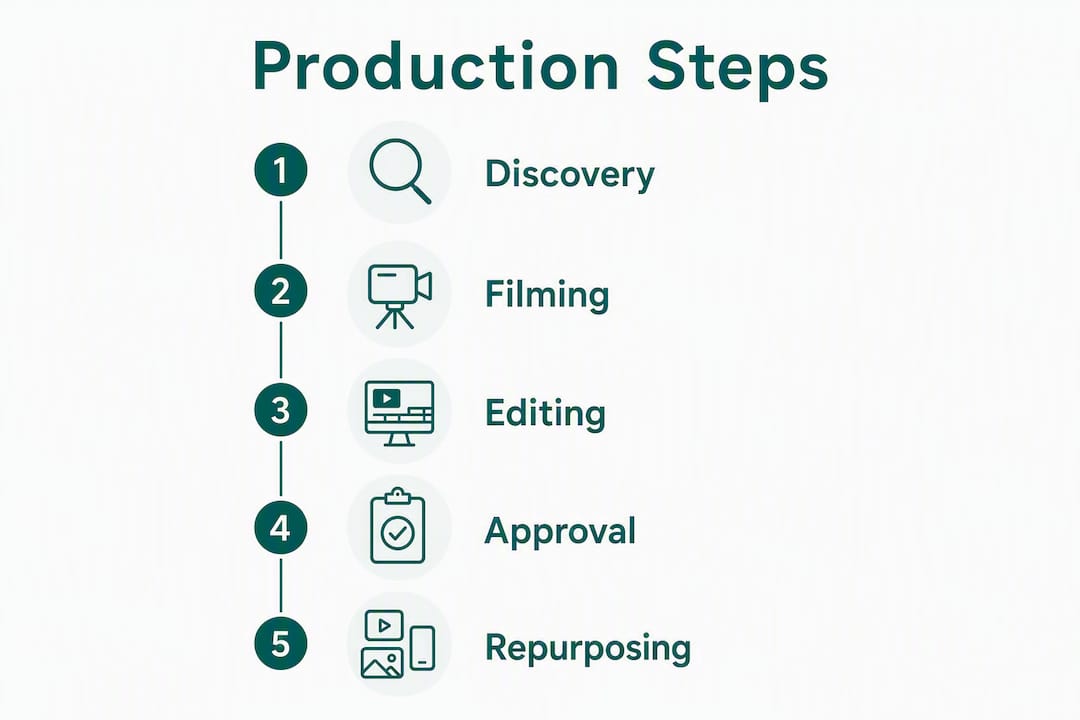
Run a 30–60 minute discovery session with HR, recruiting, and marketing. Output: a one-page creative brief covering EVP, target candidate persona, approved employee participants, shoot location, and distribution plan. Get sign-off before any camera is booked.
Build a shot list that covers: employee interviews (3–5 people, 10–15 minutes each), B-roll of real work environments, team interactions, product or service in use, and office exteriors. Sample interview questions HR can copy directly:
A single half-day on-site shoot can generate a 60–90 second hero film, three social cutdowns, and B-roll for the careers page, provided the brief and shot list prioritize repurposing from the start. Keep the crew small (two to three people) to minimize disruption.

Edit the hero first. Lock picture before cutting social versions. Build one approval round into the timeline with a clear deadline. Unlimited revision cycles are the single biggest cause of delayed launches.
| Source asset | Derivative | Channel | Use |
|---|---|---|---|
| 60–90s hero film | Full version | Careers page, YouTube | Primary conversion asset |
| 60–90s hero film | 30s cutdown | LinkedIn paid | Top-of-funnel awareness |
| 60–90s hero film | 15s cutdown | Instagram Reels, TikTok | Organic reach |
| Employee interviews | Quote clips (20–30s) | LinkedIn organic | Employee advocacy |
| B-roll | Looping visuals | Website homepage | Brand atmosphere |
Getting leadership on camera: frame it as a two-question, ten-minute commitment. Leaders who appear in employer brand content normalize employee participation and accelerate adoption across teams. That is both a content win and a change-management lever.
| Platform | Format | Recommended length | Distribution tip |
|---|---|---|---|
| 16:9 or 1:1, captions on | 90–120 seconds | Native upload outperforms links; add captions for silent autoplay | |
| YouTube | 16:9, full resolution | 90–120 seconds | Optimize title and description for “careers at [company]” searches |
| Instagram Reels / TikTok | 9:16 vertical, captions on | 15–30 seconds | Hook in first 2 seconds; end with a text CTA overlay |
| Careers page | 16:9, auto-play muted | 90–120 seconds | Place above the fold; link directly to open roles below the player |
Company culture videos typically run 90–120 seconds, while social cutdowns perform best at 15–30 seconds. Attention drops sharply after 30 seconds on mobile feeds, and careers-page visitors will watch longer because they arrived with intent.
A few quick rules:
For professional-services employers, such as accounting or legal firms, the careers page placement is especially high-value. Candidates researching those firms often read deeply before applying, and a well-placed employer video on the careers page can answer the questions that would otherwise go unanswered.
| Production tier | What you get | Typical cost range | Timeline |
|---|---|---|---|
| Low (internal or lean crew) | Smartphone or DSLR, editor, one location, unscripted | Modest budget | Few weeks |
| Mid (professional crew) | Small professional crew, professional equipment, few locations, light scripting | Mid-range budget | Several weeks |
| High (agency or full production) | Full production with director, multiple locations, animation, licensed music | Higher budget | Extended timeline |
Phase-by-phase timeline for a mid-tier production:
Cost factors that most affect price:
Track these KPIs, in order of how directly they connect to hiring outcomes:
For attribution, create a dedicated UTM parameter for each distribution channel and point all video CTAs to a unique landing page or tagged careers URL. That setup lets your ATS show you exactly which video placements drove applications.
Haleon’s employee-driven video program demonstrated that measuring CTR to applications is achievable even for large, distributed organizations. Start with one role or one team, set a baseline apply rate from your current job page, and measure the lift after adding video. That small experiment gives you the data to justify a broader rollout.
Sample targets for a mid-tier production on LinkedIn paid include a range of click-through rates and application rates, with potential improvements in time-to-hire for targeted roles.
Before the crew arrives:
Common pitfalls and how to avoid them:
Pro Tip: Film a short “behind the scenes” clip on a phone while the crew is shooting. That raw, unpolished content often performs better on Instagram Stories than the finished video does.
studio2U’s process is built around one constraint most HR teams share: you cannot shut down operations for a film crew.
Differentiators that matter for busy HR and marketing teams:
For finance and professional-services clients, studio2U builds controlled visual consistency into the brief from day one: lighting standards, wardrobe guidance, and privacy approvals are confirmed before filming begins, not after.
A single well-briefed employer brand video shoot, built around authentic employee voices and a clear repurposing plan, consistently outperforms a library of generic job postings for candidate quality and apply rate.
| Point | Details |
|---|---|
| Brief before you book | Lock EVP, candidate persona, and distribution channels in a one-page brief before any crew is scheduled. |
| Hero plus cutdowns | Produce a 90–120s culture hero and 15–30s social cutdowns from one shoot to cover every major channel. |
| Measure apply rate first | Track CTR to careers page and apply rate lift before optimizing for views or impressions. |
| Unscripted beats scripted | Employee answers to real candidate questions outperform polished scripts for perceived authenticity. |
| studio2U for low-disruption shoots | studio2U delivers a hero film, social cutdowns, and B-roll from a half-day on-site shoot with five-day turnaround. |
The conventional advice is to “tell your story.” That framing sends HR teams straight to a founder monologue or a mission-statement voiceover, which is exactly what candidates skip.
The videos that actually convert qualified applicants do something more specific: they answer the questions candidates are already asking before they apply. What does the team dynamic feel like? What does a bad week look like, and how does the company handle it? What does growth actually mean here, not in the abstract?
Leadership on camera matters, but not for the reason most guides cite. It is not about authority or credibility. It is about signaling that the company takes its employer brand seriously enough to put senior people on record. That signal is what gets employees to participate willingly, which is where the real content comes from.

The repurposing plan is also consistently underbuilt. Most teams commission a hero video and treat the cutdowns as an afterthought. The brief should specify every deliverable before filming begins, because the shot list changes depending on what you need to cut. A 15-second Reels clip needs a different opening shot than a 90-second careers-page film.
studio2U brings a full production team directly to your office, anywhere in the U.S., and delivers a 60–90 second hero film plus social cutdowns within five business days of the shoot. No studio rental, no disruption to your team’s schedule, and no generic stock footage.

For HR and recruiting teams that need content for an active hiring push, that turnaround is the difference between publishing during peak candidate attention and publishing after the moment has passed. One half-day shoot produces assets for your careers page, LinkedIn, Instagram Reels, and internal communications simultaneously, spreading the production cost across every use case.
Request a sample creative brief or book a discovery call to scope your employer brand video project with studio2U.
