Photo Day Checklist: Prep Your Team and Office
%20(1)%201.png)
.png)
.png)
October 11, 2026
%20(1).jpg)

A smooth office video shoot comes down to three things: a clear brief, confirmed logistics, and a short shot plan everyone has seen in advance. Before you book, have your project brief, a building contact with a confirmed access window, and your participant list ready. Expect an interview-driven project to turn around faster than a fully scripted brand film.
TL;DR:
- Interview prompts usually produce more natural footage than memorized lines; reserve scripts for messages, such as product announcements, that must land exactly.
- Office shoots last half a day to a full day; interview edits take one to two weeks, versus four to eight weeks for scripted films.
- Limit feedback to two rounds through one reviewer, and set a three business day approval deadline to keep approval from delaying delivery.
- Route cables away from busy walkways, protect doorway crossings with ramps or tape, and weight lighting stands near foot traffic.
- Stagger interview call times, schedule quiet interviews during calmer office hours, and film genuine team activity when the floor is naturally busier.
Most delays trace back to decisions nobody made before the crew showed up. Working through these items first keeps the shoot day focused on filming instead of figuring things out.
A video release form template can speed up the consent step, particularly when participants include outside guests or customers who need clear disclosure language. Once these pieces are in place, the production team can staff and schedule the shoot without guesswork, and you avoid the common trap of discovering a missing signature the morning of filming.
Scripted lines sound polished but can feel stiff on camera, especially from employees who are not used to performing. Interview prompts tend to produce more natural, usable footage because people are answering questions rather than reciting copy, while a tight script makes more sense when the message has to land in an exact way, such as a product announcement.
A strong interview structure follows a simple arc:
Beyond the questions, a compact shot list keeps the crew moving. Note the coverage you need for each setup: wide, medium, close, and a few cutaway ideas for B-roll. Timebox each take so interview subjects do not fatigue, and build in slots for the kind of incidental footage, a hallway walk, a team huddle, that editors rely on to bridge between scenes.
Pro Tip: Ask each interview subject to restate the question in their answer, so the clip makes sense even without the question included in the edit.
The best office backgrounds have depth, light you can control, and low ambient noise, think a window wall, a lounge area, or a clean hallway rather than a cramped cubicle row. Our office backdrop guidance covers specific setups that read well on camera without looking staged.
Before the shoot day, share what the crew needs to plan around:
Cable management deserves its own plan. OSHA guidance on temporary wiring allows flexible cords through doorways and walkways as long as they are protected from damage, which in practice means nail-free cable ramps, gaffer tape, and routes that avoid high-traffic paths. Coordinating with facilities on timing for busy corridors prevents both tripping hazards and interruptions to the footage.
Knowing the sequence ahead of time helps your team show up relaxed instead of anxious about what comes next.
Most office shoots run a half day to a full day depending on the number of participants and locations, and knowing this sequence in advance lets your team block calendars accurately instead of guessing at availability.
Office environments bring specific technical challenges: glass walls, fluorescent lighting, and background noise from HVAC systems or open floor plans. A few equipment choices solve most of it.
For B-roll, editors consistently want the same handful of shots: people genuinely collaborating, close-ups of hands on a product or keyboard, and short walk-and-talk inserts that give an edit movement between talking-head segments.
Pro Tip: Shoot a few extra seconds of silence and stillness before and after each take, since editors use that padding for clean cuts and transitions.
Post-production timelines depend heavily on format. A quick interview edit can deliver a first cut in one to two weeks, while a fully scripted brand film with graphics and multiple approval rounds commonly runs four to eight weeks.
A crew in the building for a day will inevitably interrupt someone’s meeting or walk through someone’s sightline, and planning for that upfront keeps goodwill intact. Send a short notice to the floor or team ahead of time explaining what is happening, roughly when, and which areas will be in use.
Designate one internal point person who can answer questions, pull people for their interview slots, and make quick calls on minor changes without looping in leadership every time. This person becomes the crew’s single contact, which avoids the common problem of a production team getting conflicting instructions from different employees.
Stagger participant call times instead of asking everyone to show up at once. Someone waiting around for two hours before their five-minute interview is a frustrated participant, and frustration shows on camera. A simple schedule with buffer time between slots keeps the day calmer for everyone, including people who are not being filmed but are trying to work nearby.
If the office has open floor plans, consider scheduling noise-sensitive setups like the main interview during a quieter part of the day, and save background B-roll of general activity for whenever the floor is naturally busier. That sequencing captures more authentic activity instead of asking people to perform being busy on cue.
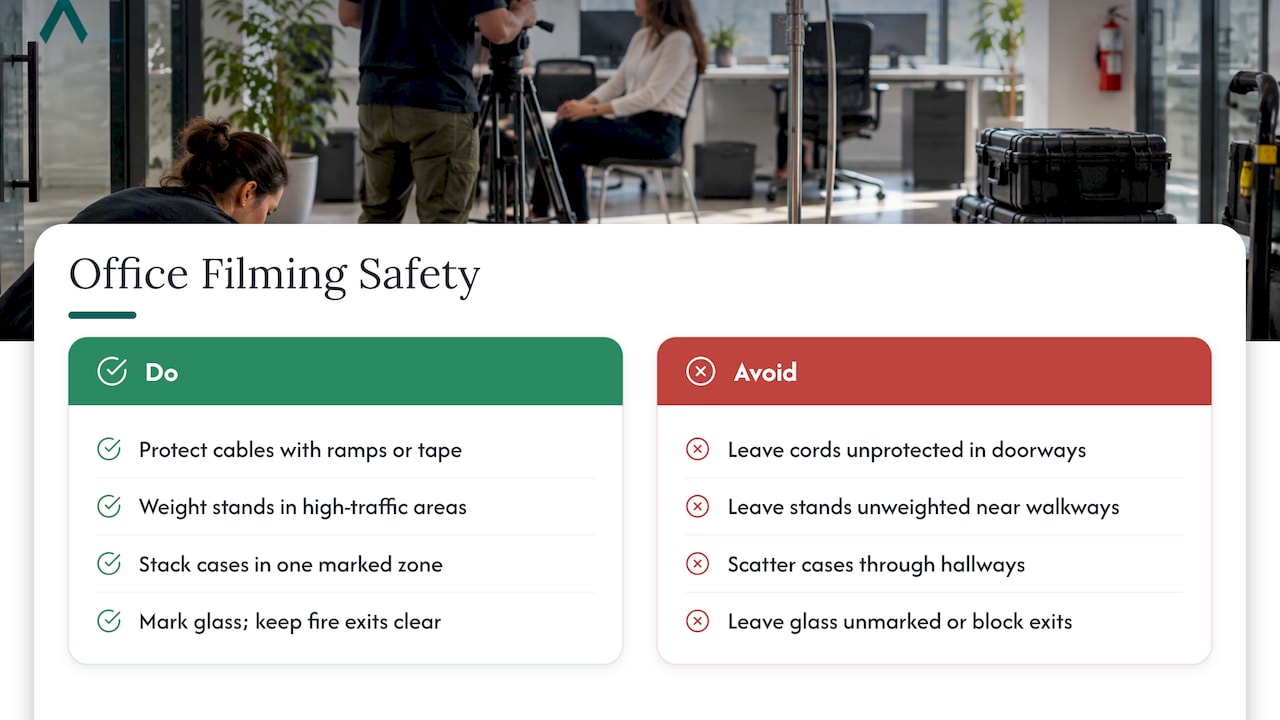
Safety on an office shoot mostly comes down to managing cables, lighting stands, and foot traffic in a space that was not designed for a film crew. OSHA’s guidance on flexible cords requires that temporary cords and cables be kept in good repair and not create trip hazards, and permits them through doorways only when protected from damage, which is why cable ramps and tape matter more than they might seem to on paper.
Lighting stands and C-stands need sandbags or weighted bases in high-traffic office areas, since a stand that tips over near a walkway is a liability nobody wants. Keep gear cases stacked in one marked staging zone rather than scattered through hallways, so people moving through the office are not navigating an obstacle course.
Glass walls and reflective surfaces, common in modern offices, create their own hazard: a crew member backing up to frame a shot can walk into glass they did not register as a wall. Marking glass panels with removable tape during setup is a small step that prevents a real injury.
Finally, confirm fire exits and emergency procedures with your building contact before equipment goes up, particularly if gear will temporarily block a hallway or stairwell landing. A five-minute conversation at the start of the day resolves this far more easily than an incident in the middle of filming.
The footage that feels authentic almost never comes from asking people to act natural. It comes from giving them something real to do and filming around it: a genuine team stand-up, an actual product discussion, people grabbing coffee between meetings.
Our office lifestyle photography approach applies directly to video: pick real work moments happening anyway, and position the crew to capture them without interrupting the flow. Asking two colleagues to fake a conversation for the camera almost always looks exactly like what it is.
Give participants a task instead of an instruction to “look natural.” Someone reviewing a document, sketching on a whiteboard, or walking to grab something from another desk gives the camera motion and purpose, and the subject something to focus on besides the lens pointed at them.
Shoot in bursts rather than one long continuous take. A minute of real interaction, captured a few different ways, gives editors far more usable footage than ten minutes of people trying to sustain a conversation they know is being filmed. The best cutaways often happen in the first thirty seconds, before self-consciousness sets in, so keep the camera rolling earlier than you think you need to.

We start every office shoot with a discovery conversation, not a shot list, so the footage ties directly to the outcome you need, whether that is a founder story or a recruiting piece. Portable studio setups and standardized workflows let us run consistent production across multiple office locations without reinventing the process each time, which matters for organizations filming at more than one site.
— Kevin

If you need an office shoot without managing a production company from scratch, we bring the crew, the gear, and the discovery process to you. Our START UP package fits a single-location video and headshot combination, while STANDARD and ENTERPRISE options on our branding services page scale for multi-office or larger participant counts. Before reaching out, have your project brief, preferred dates, and participant count ready. Request a quote through our branding page and we will map the right package to your shoot.
Office-based corporate video is often described as “documentary-style” or “verité” corporate video, since it prioritizes real interactions and interview-driven storytelling over scripted scenes. The approach favors natural lighting and candid moments captured during normal work activity rather than staged performance.
Corporate video pricing commonly ranges from about $2,000 to $10,000 per project, depending on complexity, crew size, and deliverables rather than runtime alone. A short interview-driven piece typically falls toward the lower end, while a scripted film with graphics and multiple locations moves toward the higher end.
Companies film in their own offices to capture authentic culture, team interactions, and real work moments that support recruiting, sales, and internal communication. Shooting on location also keeps costs down compared to building a set and gives the footage a credibility that staged studio scenes cannot replicate.
An office video is any corporate video filmed inside a company’s own workspace, ranging from employee interviews and culture pieces to product demonstrations and executive messages. These videos typically combine interview footage with B-roll of the physical space and team activity to show, rather than just describe, how the organization works.
