Photo Day Checklist: Prep Your Team and Office
%20(1)%201.png)
.png)
.png)
October 16, 2026
%20(1).jpg)

Use 9:16 for short-form vertical video on TikTok, Instagram Reels and YouTube Shorts, 16:9 for long-form YouTube, and 1:1 or 4:5 for feed posts and carousels. Export vertical files at 1080×1920 and horizontal files at 1920×1080, then check each platform’s file-size and length limits before you upload. Platform spec guides and a university marcom best-practices PDF agree on these basics.
TL;DR:
- Keep faces, products, and essential text centered with extra headroom; this protects key content when editors crop one high resolution shoot into multiple ratios.
- Keep captions inside the safe area, use large, high contrast text, and upload separate caption files when supported so viewers can edit and search them.
- Check current documentation for Pinterest, Snapchat, and paid ads, because their requirements may differ from the ratios used in organic feeds.
- No ratio guarantees an algorithmic boost; test identical videos in two formats at similar times, changing one variable, then compare watch time and completion.
The table below puts the recommended ratio, a practical export size and one quick note for each platform in one place. Ratios come from a 2026 platform-spec roundup, and the export sizes follow the university best-practices guidance of 1080×1920 for vertical and 1920×1080 for horizontal.
| Platform and placement | Recommended ratio | Example export size | Quick note |
|---|---|---|---|
| TikTok | 9:16 | 1080×1920 | Full-screen vertical is the native format |
| Instagram Reels | 9:16 | 1080×1920 | Interface overlays sit over the frame |
| Instagram feed and carousel | 1:1 or 4:5 | 1080×1080 (1:1) | 4:5 takes more vertical screen space |
| Facebook feed | 1:1 or 4:5 | 1080×1080 (1:1) | Square keeps ads consistent |
| Facebook Reels | 9:16 | 1080×1920 | Treat it like any other Reels placement |
| YouTube long-form | 16:9 | 1920×1080 | Vertical uploads may be pillarboxed on desktop |
| YouTube Shorts | 9:16 | 1080×1920 | Shorts are a separate vertical format |
| LinkedIn feed and video | 16:9 or 9:16 | 1920×1080 or 1080×1920 | Choose by placement |
| X (in-feed) | 1:1 | 1080×1080 | Brand guidance lists 1:1 for X |
Pinterest and Snapchat sit outside our sourced specs, so check each platform’s current documentation before publishing there. We did not find a figure we could stand behind for them, and guessing is how videos get cropped.
A few patterns hold across the table. Vertical 9:16 owns short-form discovery feeds. Square and 4:5 own the scrolling feed, where a taller frame claims more of the screen. Horizontal 16:9 owns anything watched on a TV, a laptop or a long-form YouTube page. Our reading is that a small set of master formats can cover nearly every placement: vertical, landscape, and square or 4:5 crops.
The same brand guidance recommends checking platform documentation before you publish, because specs shift and placements get added. Treat the table as a starting point and the platform’s own help page as the final word.
Choose the ratio from the placement backward, not from the camera forward. The right answer depends on three things: where people watch, what you are showing and where the video will be distributed.
Where people watch. Mobile ergonomics favor vertical video, while TVs and desktop viewers still favor horizontal framing. That split means both formats will coexist, so you plan for each rather than picking a permanent winner.
What you are showing. A single speaker, a product close-up or a quick demo suits vertical. A wide office, a panel or a scene with several people suits horizontal.
How it is distributed. Organic short-form feeds reward vertical. Paid placements often demand specific ratios for consistency. Long-form hosts such as YouTube default to 16:9.
Use these rules to settle the choice:
The workflow is short. Name the primary placement that matters most for this video. Shoot in its native ratio. Keep the subject and key graphics inside a centered safe area so a vertical, square or landscape crop can be pulled from the same footage later.
Pro Tip: Write the primary placement at the top of your shot list before anyone picks up a camera. Every framing decision downstream gets easier.
For run-time guidance to pair with your ratio choice, our post on B2B video length covers what works by format. If you are mapping content types to formats, our overview of corporate video types helps you decide where landscape and vertical each earn their place.
Composition changes with the frame. Colorado State’s social media guidance describes horizontal 16:9 composition as additive: the wide frame lets you build a world with several subjects and context around them. Vertical 9:16 composition is subtractive: you focus intensely on a single subject and strip away background distractions. Think of a wide frame as a stage and a tall frame as a portrait.
That distinction drives every practical decision on set. A talking head in 9:16 should fill the frame with face and shoulders. A team scene in 16:9 can breathe, with people at different depths and the environment telling part of the story.
Follow these steps for a shoot that serves several formats:
Talking-head videos are the most forgiving to repurpose, because a centered speaker survives almost any crop. Multi-person scenes are the hardest, since a crop to 9:16 can cut someone out entirely. When in doubt, shoot two versions of the key moment: one composed wide and one composed tight and vertical.
Pro Tip: Turn on your camera’s grid overlay and mark the center area. If the key information lives inside it, every crop will work.
Quality at capture matters too. The university best-practices PDF recommends shooting in the highest resolution possible, which gives you room to crop without visible softness.
Export settings decide whether your carefully framed video arrives looking sharp or compressed into mush. Keep the checklist simple and consistent.
Subtitles matter because many people watch with the sound off, according to the university best-practices guidance, so a video without captions loses a chunk of its audience.
Format and metadata also affect how widely your video travels. A video SEO guide explains why titles, descriptions and file choices shape visibility and organic reach, which is worth reading once your exports are clean. If you plan to reuse clips on a website or in presentations, our guide to the best photo and video for a website shows how to adapt the same footage.
Before uploading, run a quick preview on a real phone. Check that captions are readable, nothing important is cropped and the first frame makes sense as a thumbnail.
Most placements follow the cheat sheet, but a few have quirks that cause cropped titles, covered captions and ad rejections. Watch for these:
The practical lesson is the same everywhere: build in margins. A safe area that keeps text and faces away from the edges protects you from every overlay at once.
Aspect ratio influences engagement mostly through fit, not through some hidden bonus. We do not have a sourced figure showing that one ratio outperforms another, so treat any claim of a guaranteed algorithmic boost with suspicion.
What we can say is practical. A video that matches its placement fills the screen, which gives viewers less reason to scroll past. Platforms built around vertical viewing, such as TikTok, Reels and Shorts, present 9:16 as the native experience, so a landscape video there shows up smaller and with bars. That is a weaker first impression, and first impressions decide whether someone keeps watching.
In the feed, taller formats such as 4:5 take up more of the screen than a square, which can help a video stand out among neighbors. On the flip side, a vertical video forced into a landscape page gets pillarboxed, which wastes space and shrinks your subject.
Our advice: let the placement set the ratio, and put your effort into the first seconds of the video, captions and clear framing. Those choices drive watch time, and watch time is what recommendation systems tend to reward. Then use your own analytics, covered below, to confirm what works for your audience instead of trusting a rule of thumb.
The biggest shift is that vertical is now a default, not an exception. A 2026 platform-spec roundup lists 9:16 as the recommended ratio for TikTok, Instagram Reels and YouTube Shorts, which means three major short-form destinations share one format. Even LinkedIn, long a landscape-first environment, now lists both 16:9 and 9:16 depending on placement.
Meanwhile, 16:9 is not going away. Viewing behavior is split: phones favor vertical, while TVs and desktop viewers still favor horizontal. The result is a coexistence of formats, which is why repurposing-first production makes sense.
Two other trends are worth watching. First, creative ratios are used on purpose when the story calls for them. Cloudinary’s guidance notes that cinematic work may call for 21:9 and nostalgic or creative choices may call for 4:3, though those suit specific projects rather than everyday social posting. Second, automation is growing. The same guidance recommends tools that reformat and optimize video for each delivery channel, which reduces the manual work of producing every version.
The takeaway: plan for a small set of core ratios, stay flexible about new placements and re-check platform documentation regularly, since formats keep shifting.
Your own data beats any generic recommendation. The goal is to find out whether your audience responds differently to the same content in different formats.
Start with a clean test. Publish the same video in two ratios, such as 4:5 and 1:1 in the feed, at similar times and with identical captions. Change one variable at a time, or you will not know what caused the difference.
Then compare the metrics that matter for the goal:
Break results down by placement, since a ratio that works in Reels may not work in the feed. Look at device data where the platform offers it, because mobile and desktop audiences can behave differently. Review results over weeks, not days, to smooth out one-off spikes.
Record what you learn in a simple log: ratio, placement, topic, results and notes. After a month or two, patterns emerge, and your shoot planning improves. If you also schedule posts across platforms, a guide to scheduling social posts can help you keep publishing consistent while you test.
Accessibility and aspect ratio meet in one place above all: text and captions. Because many people watch with the sound off, subtitles help hearing-impaired viewers and everyone watching in a noisy or quiet setting. Captions only help if they stay readable, so the frame you choose matters.
In vertical video, interface overlays can cover the bottom of the screen, so place captions in the safe area rather than hugging the edge. In square and 4:5 formats, keep text large enough to read on a small phone. In landscape, avoid tiny type that becomes unreadable once the video shrinks inside a feed.
Other practical steps help:
Planning these choices before the shoot costs almost nothing. Fixing cropped captions after the fact usually means re-editing every version.
We cannot point you to a named campaign with published results, and we will not invent one. What we can offer is a pattern we see work for corporate video: one planned shoot, several purposeful outputs.
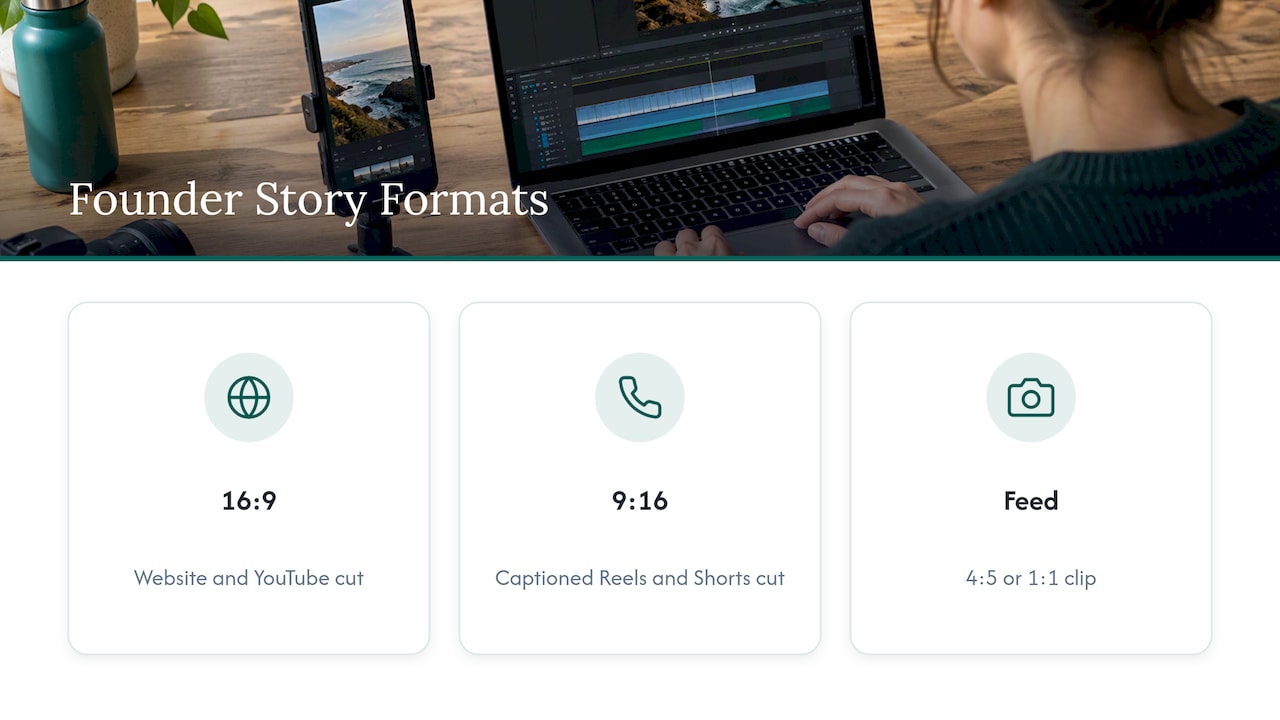
Take a founder story video. The team shoots a single on-location interview with the speaker centered and extra headroom left. From that footage, the editor delivers a 16:9 cut for the website and YouTube, a 9:16 cut with captions for Reels and Shorts, and a 4:5 or 1:1 clip for the feed. Each version uses a different opening line or crop, but all of them come from one session, with no re-shoot.
An event works the same way. Wide shots become a landscape recap, tight reaction and speaker moments become vertical highlights, and a square clip carries the best quote into a carousel. Our post on the video case study format shows how long-form and short-form cuts can grow out of one production.
The strategy behind both examples is the same: decide the placements before filming, protect a central safe area, and treat every deliverable as a planned output instead of an afterthought. That is what separates a library of reusable assets from a single video that fits one platform.
We recommend planning deliverables by primary placement first, then shooting so safe vertical and square crops stay available for feeds, Reels, Shorts, ads and the web. Settling ratios in pre-production prevents rework and gets content published faster, which is why we open every project with strategic discovery and move quickly in editing. If you publish across many platforms and captions pile up, a production partner can manage multi-format exports at scale.
— Kevin
We produce on-location video branding and short-form social assets. Book a discovery call and we will plan a ratio-informed shoot around your goals. Explore our branding services, or see our conference packages if you need event content.

16:9 is the better choice for most social video. It is the recommended ratio for long-form YouTube, while 4:3 is a nostalgic or creative choice that suits specific projects. For feeds, 1:1 or 4:5 usually fits better than either.
TikTok videos are 9:16. The 2026 platform-spec roundup lists 9:16 for TikTok, Instagram Reels and YouTube Shorts. Export at 1080×1920 for a full-screen result.
1920×1080 is the standard export size for horizontal 16:9 video, so it fits long-form YouTube and landscape placements such as LinkedIn. The university best-practices guidance recommends it for horizontal video. Its vertical counterpart is 1080×1920.
Use 9:16 for TikTok, Reels and Shorts, 16:9 for long-form YouTube, and 1:1 or 4:5 for Facebook and Instagram feed posts, per the 2026 spec roundup. Export vertical at 1080×1920 and horizontal at 1920×1080. Confirm each platform’s current documentation before publishing.
