On-Camera Coaching for Executives: A Practical Guide
%20(1)%201.png)
.png)
.png)
August 20, 2026
%20(1).jpg)

The fastest, most reliable way to deliver consistent, on-brand company-wide headshots is a centrally governed, on-site portable-studio program with a locked style guide and centralized retouching. This approach balances brand consistency, minimal workplace disruption, and predictable per-head costs better than DIY tools or scattered local photographers. Start with a one-office pilot, lock your style guide from those results, then scale to the rest of your locations.
A centrally governed on-site portable-studio program with a locked style guide is the most reliable way to deliver consistent company-wide headshots across multiple offices.
| Point | Details |
|---|---|
| Pilot before you scale | Shoot one office first, lock your style guide, then roll out to remaining locations. |
| Centralize retouching | One retouching workflow across every office prevents visible style drift between locations. |
| Budget beyond per-head cost | Include travel, setup, retouch tier, and admin time in every vendor quote request. |
| Plan for makeup sessions | Build a 2 to 3 week return window into your schedule for employees who miss the initial shoot. |
| Studio2U for multi-location rollouts | Studio2U offers on-site portable studios, centralized retouching, and five-business-day turnaround built for HR-led enterprise programs. |
A program is working when your team page stops looking like a collage of five different photographers’ styles. That’s the real test.
Concrete markers of success include:
Pro Tip: Track “time-to-live-asset” as a metric, not just delivery date. A headshot delivered on time but stuck in an approval queue for three weeks isn’t actually a fast turnaround.
A properly scoped rollout produces web-ready JPGs, print-resolution TIFFs for press and investor decks, and directory thumbnails sized for your intranet or Slack profiles.
Three approaches dominate company-wide headshot planning, each solves a different problem.
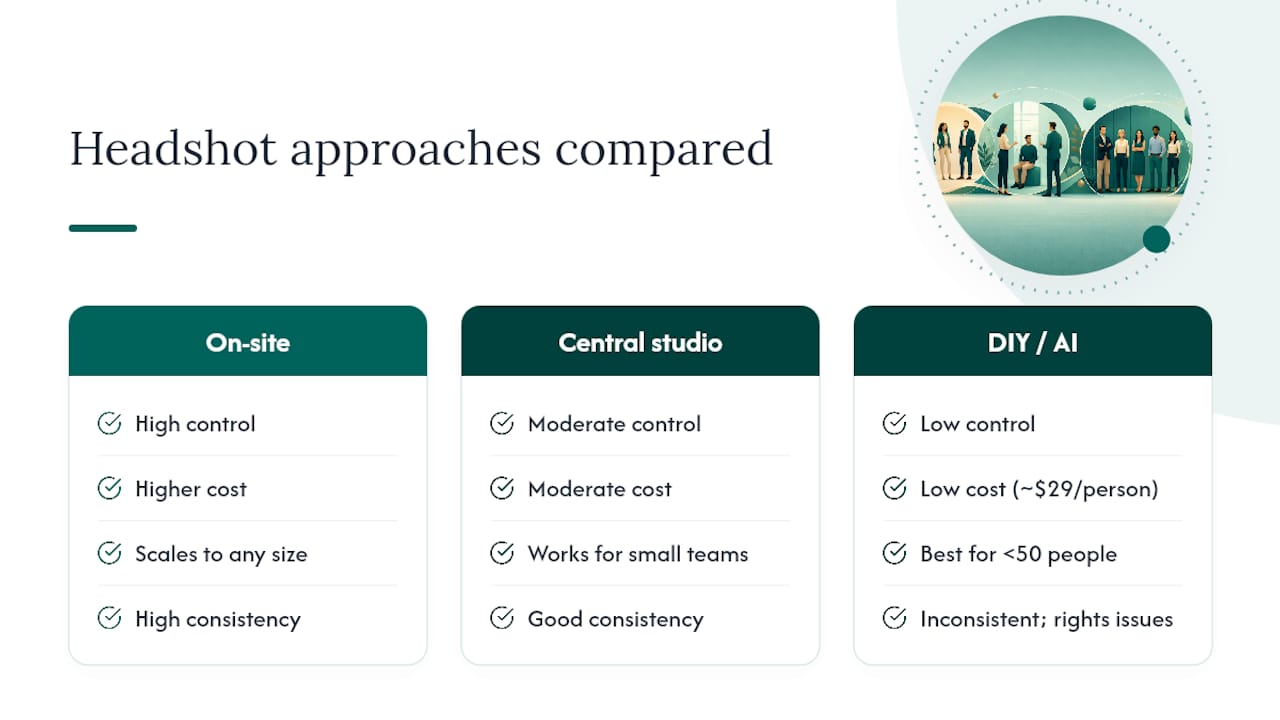
On-site portable studio. A photographer and lighting setup travel to each office. This wins on control: one style guide, one retouching pipeline, one photographer or trained team following the same reference frames across every location. It costs more per head than DIY tools but scales cleanly across offices and headcounts of any size.
Central studio sessions. Staff travel to one studio location, often used for executive teams or headquarters-only shoots. It works well when you have a small number of people to photograph and one central office, but it falls apart once you’re coordinating five offices and 400 employees who can’t all fly in.
DIY or AI-generated headshots. Employees upload a selfie and AI tools generate a corporate-style portrait with a standardized background, often for around $29 per person. It’s the cheapest and fastest option on paper, but consistency depends entirely on the input photo quality, and questions around image rights and authenticity tend to surface later, particularly for public-facing executive bios.
If you have 500-plus employees spread across multiple offices, a portable studio program is the only approach that holds consistency at that scale. Small organizations with a handful of executives can get away with a central studio day. Distributed teams under 50 people scattered globally sometimes lean on managed AI or self-upload platforms as a stopgap.
Before you request a quote from anyone, nail down four things: headcount by location, what percentage of staff need photos (executives only versus everyone), your required deliverables, and your usage rights needs for press, ads, and recruiting materials.
A realistic rollout timeline looks like this:
Budget planning should account for more than just the per-head photography fee. Here’s a sample structure to bring to procurement:
| Cost Driver | Typical Range Factor |
|---|---|
| Photography (per head) | Scales with headcount and retouch level |
| Travel and setup per office | Fixed cost regardless of headcount at that location |
| Retouching tier | Basic color correction vs. advanced editorial retouch |
| Admin and booking time | Internal HR hours coordinating schedules |
| Rush delivery fees | Applies if turnaround is compressed below standard SLA |
Ask any vendor to break out travel and setup separately from per-head photography. That’s where quotes get padded without buyers noticing.
Shoot-day execution determines whether employees remember the experience as smooth or disruptive.
Pre-shoot logistics that matter most:
Equipment for a portable setup typically includes a collapsible backdrop system, one or two soft light sources, a fill flash for the eyes, a primary camera with backup body, and a laptop for tethered capture so images preview on a screen in real time. Portable lighting and quick-assembly gear are standard for corporate portraiture shot inside office environments rather than a dedicated studio.
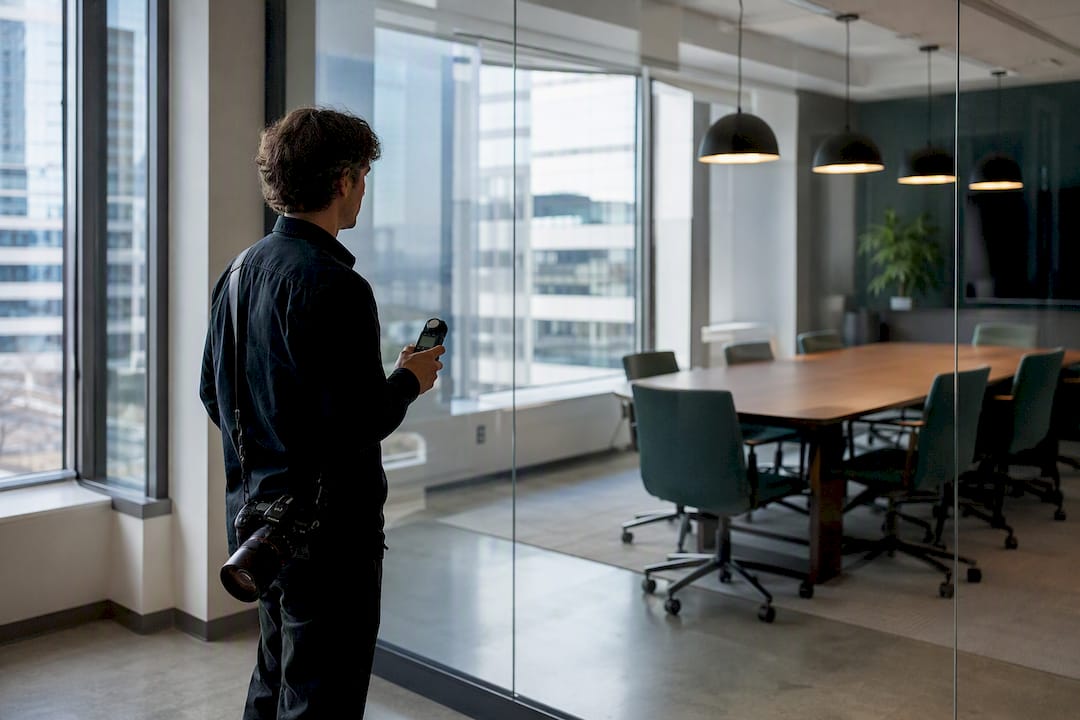
Office spaces create predictable problems. Glass walls throw reflections into frame, fluorescent lighting casts a green tint that gels correct, low ceilings limit bounce-light options, and tight conference rooms push photographers toward longer focal lengths to avoid distortion. Scouting each location in advance for window light and reflective surfaces heads off most of these issues before the crew even arrives.
Pro Tip: For group or team shots, shoot them last. Individual headshots require focused attention per person; group shots go faster once everyone’s already dressed and in the shooting mindset.
Standard deliverables from a well-run program include web-ready JPGs cropped for your site’s headshot grid, print-ready TIFFs or high-resolution JPGs at 300dpi for press kits and investor decks, directory thumbnails, and sometimes transparent-background PNGs for flexible placement.
Retouching comes in tiers:
If your images are headed for your Google Business Profile, keep in mind the platform’s own size and format guidance: JPG or PNG files between 10 KB and 5 MB, with 720x720 pixels recommended. Companies with 10 or more locations can bulk-upload photos through a spreadsheet, which matters if you’re syncing headshots to location-specific profiles.
A five-business-day turnaround for core assets is a reasonable baseline to request from any vendor, with revision rounds specified upfront so redos aren’t a surprise line item.
Consistency lives or dies in the style guide, not in hiring a “good photographer” at each location.
A working style guide documents backdrop color, crop and headroom (how much space above the head), the lighting preset, wardrobe recommendations covered in more detail in Studio2U’s guide to headshot attire, and even approved expression guidance, since a company that wants warm smiles across every office shouldn’t end up with half the team looking stern.
Pro Tip: Print your locked reference frames and hand a physical copy to whoever runs each pop-up day. A PDF buried in an email thread gets ignored; a printed sheet on the tripod gets followed.
Run every headshot vendor through the same short list before committing budget.
When checking references, ask specifically about schedule adherence and whether the final images across offices looked like one program or several. Red flags include vague answers on centralized editing, no clear turnaround commitment, and no admin tools for managing a rollout across HR teams. Studio2U’s on-site portable-studio model was built around exactly this kind of enterprise coordination.
The biggest lever is batching. Group nearby offices into the same travel trip, and run pop-up days back to back instead of scheduling one-off visits, since travel and setup fees are largely fixed per trip regardless of headcount.
A hybrid model works for organizations with a concentrated headquarters and small remote pockets: run the on-site program for your main offices and executives, and reserve a vetted AI or self-upload option, like the enterprise dashboards some platforms offer, only for tiny distributed teams where a shoot day isn’t logistically worth it. Ask vendors about volume discounts once you cross a few hundred employees. That’s usually where per-head pricing starts to bend.
Usage rights confusion causes more post-shoot headaches than any lighting problem ever does. Before the shoot day, nail down exactly what your company can do with the images and for how long.
Most professional headshot agreements grant the company a license to use the images across specified channels: website, internal directory, LinkedIn, press materials, and recruiting. That’s different from owning full copyright to the raw files. Clarify upfront whether your contract includes perpetual usage rights or a time-limited license, since some vendors restrict usage to a set period and charge renewal fees afterward.
Centralize the final asset library in one shared location your marketing, HR, and communications teams can all access, organized by employee name and office. Skipping this step is how companies end up six months later digging through someone’s old email attachments to find a departed VP’s headshot for a press release.
Build a simple offboarding rule into your process too: when an employee leaves, does their headshot get pulled from the public team page immediately, or does it sit there for months because nobody owns that task? Assign it to someone specific, whether that’s HR operations or a marketing coordinator, so stale photos don’t linger.
If your company photos will appear on PR materials or press kits, confirm the retouching and file specs meet those outlets’ technical requirements before the shoot, not after a journalist requests a hi-res version you don’t have.
A headshot program fails when employees skip the shoot, not when the photography is bad. Getting a high participation rate requires the same change management discipline you’d apply to any company-wide rollout.
Communicate the “why” before the schedule. Employees who understand this supports a stronger employer brand and more professional recruiting materials show up more willingly than employees who just got a calendar invite titled “Headshots, Tuesday.”
Send the logistics early and repeat them. What to wear, how long the session takes, where to go, and what happens if they’re running late. Give a wardrobe guide at least a week ahead so nobody shows up in a busy pattern that clashes with the backdrop.
Designate a point person at each office, usually an office manager or HR coordinator, to manage the sign-in sheet and keep the queue moving on shoot day. That single role prevents the most common failure mode: a shoot day that runs two hours over schedule because nobody was managing the line.
Build in a reminder cadence: an announcement two weeks out, a reminder the day before, and a same-day nudge for anyone who hasn’t checked in by mid-morning. Leadership visibly participating first, meaning executives get photographed early in the day rather than skipping the session, sets a tone that this is a real company priority and not optional.
Someone will always be out sick, traveling, or double-booked on shoot day. Plan for it rather than scrambling afterward.
Build a short makeup window into your rollout schedule, typically a return visit to each office 2 to 3 weeks after the initial pop-up day, to catch anyone who missed the first pass. Trying to squeeze stragglers into the main shoot day’s schedule usually just creates bottlenecks for everyone else.
Set a clear cutoff for who gets a formal makeup session versus who submits through a simplified process. New hires who join after the main rollout are a different case than employees who simply missed their slot; decide upfront whether new hires wait for the next quarterly pop-up or get folded into a lighter-touch interim option.
Keep the locked style guide accessible for any makeup session, even if it happens months later with a different photographer or crew. Consistency shouldn’t degrade just because the calendar moved.
Finally, decide your policy on employees who genuinely can’t be photographed on-site, whether due to remote work, extended leave, or a hard scheduling conflict across every makeup window. A clear, documented exception process prevents that gap from turning into an ad hoc mess of phone-camera selfies stuck into an otherwise polished team page.
The programs that fall apart almost never fail on photography quality. They fail on governance: no one locked the style guide before office two got scheduled, so by office four you’ve got three different backdrop shades and two different crop styles living on the same team page.
The fix is boring and it works: pilot, lock, then scale. One multi-office rollout I’ve seen described cut asset delivery time roughly in half between the pilot phase and full rollout, simply because the retouching workflow and reference frames were already settled by the time office two rolled around.
Studio2U handles this exact problem for growing companies: on-site portable studios that travel to your offices, one centralized retouching workflow so every location matches, and a five-business-day turnaround on core assets. Our teams have run multi-location programs for startups, financial firms, and enterprise clients who needed HR and procurement to see one predictable process instead of five different local photographers.

If you’re scoping a rollout across multiple offices, request a quote or book a pilot office through Studio2U and see how a locked style guide and centralized editing look on your own team before committing to a full rollout.
A pilot office typically takes 1 to 2 weeks, with full multi-office rollouts often spanning several weeks depending on headcount and number of locations.
Ask for web-ready JPGs, print-resolution TIFFs or high-res JPGs at 300dpi, and directory thumbnails; if photos feed your Google Business Profile, keep files within the platform’s 10 KB to 5 MB size range.
AI tools can work for small, distributed teams on a budget, but they raise consistency and authenticity questions that a centrally managed on-site program with a locked style guide avoids.
HR or an internal communications lead typically owns scheduling and employee communication, while the photography vendor, such as Studio2U, manages the on-site production and centralized retouching.
A five-business-day turnaround for core web assets is a reasonable baseline to build into any vendor contract, with revision terms specified upfront.
