One-Day On-site Headshots: Templates & Proofs for Corporate Organizers
%20(1)%201.png)
.png)
.png)
August 8, 2026
%20(1).jpg)

A case study video shows a real customer, the specific problem they faced, how your product or service solved it, and the measurable results they got. For startups and SaaS teams, it is the single most efficient trust-building asset you can produce. One well-executed shoot generates content for your website, sales decks, paid ads, LinkedIn, email sequences, and investor updates. The immediate next step: identify one customer with a clear, metric-based result and book a two-hour on-site shoot.
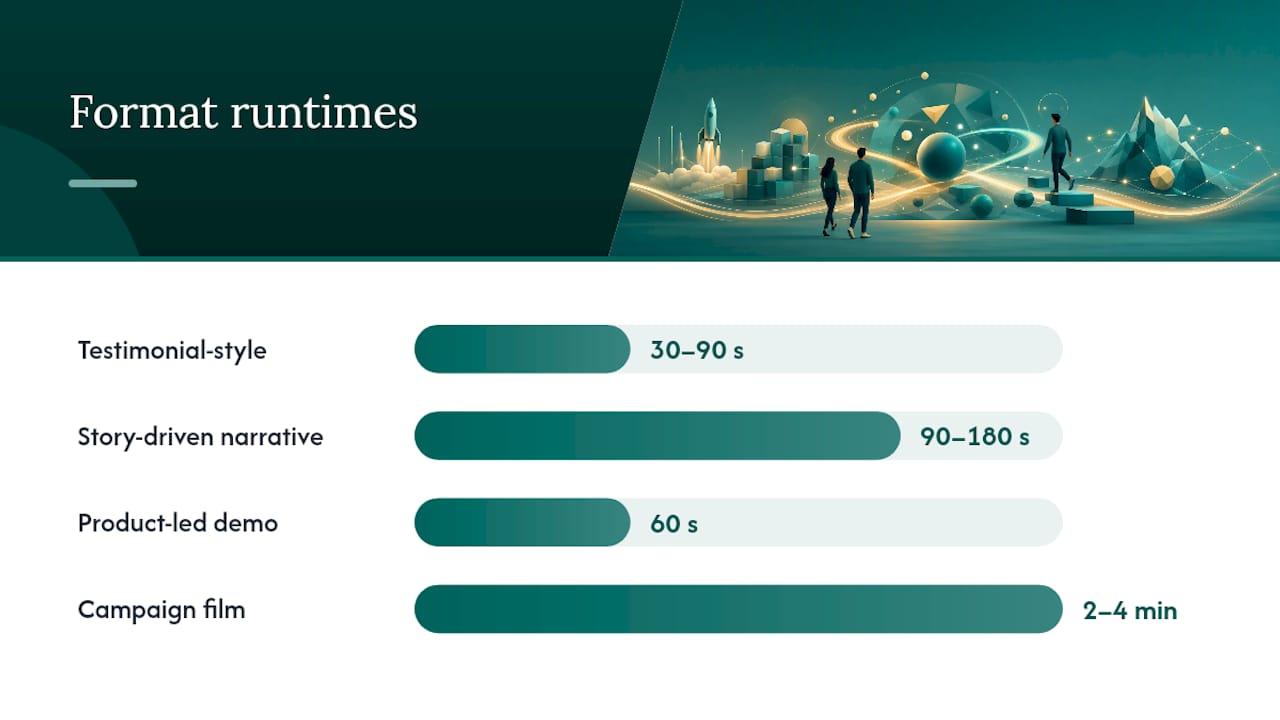
Runtime guidance at a glance:
According to Vidyard’s case study video guidance, backing your narrative with specific metrics is what separates a compelling customer story from a generic testimonial. Pick the customer whose result you can quantify, and the rest of the production falls into place.
A well-executed case study video built around a real customer outcome, a clear narrative arc, and a planned repurpose strategy is the highest-ROI content asset most startups and SaaS teams are not producing consistently.
| Point | Details |
|---|---|
| Lead with the result | Open every cut with the customer’s outcome, not your company name or product features. |
| Plan repurposing before the shoot | One shoot day can produce long-form, mid-form, short cuts, stills, and quote cards for six or more channels. |
| Audio quality is non-negotiable | A lavalier microphone is the minimum standard; poor audio undermines every other production investment. |
| Measure pipeline, not views | Track view-to-lead rate, conversion lift on pages with embedded video, and assisted pipeline value. |
| studio2U on-site workflow | studio2U brings the production team to the customer’s location and delivers all cuts within five to six weeks, including social-ready vertical formats. |
A case study video is not a testimonial and it is not a promo clip. A testimonial captures sentiment (“We love this product”). A promo clip pushes features. A case study video tells a complete story: here is who the customer was, here is the problem they could not solve, here is what changed, and here is the number that proves it. Story Machine’s production guide frames authenticity and storytelling as the primary levers for trust, not production polish.
That distinction matters for SaaS and B2B buyers specifically. Enterprise buyers are skeptical of vendor claims by default. They have seen too many polished product demos that do not reflect reality. When a peer, in their own words, describes a problem the buyer recognizes and a result the buyer wants, the credibility transfer is immediate.
Nielsen’s research on paid, owned, and earned media documents that earned signals, including peer and customer stories, carry stronger trust weight than brand-owned or paid claims. A case study video is earned credibility packaged in your owned channel. That combination is rare and hard to replicate with any other content format.
Core benefits for startups and SaaS teams:
The funnel placement is flexible. Embed the long-form cut on your homepage or a dedicated case studies page for top-of-funnel credibility. Drop the 60-second version into a mid-funnel email sequence. Hand the 30-second cut to your paid social team for retargeting. One shoot, four or five distinct use cases.
Not every customer story calls for the same treatment. The format you choose should match your buyer’s stage, your production capacity, and the complexity of the outcome you are trying to demonstrate.
| Format | Best for | Complexity | Runtime | Distribution fit |
|---|---|---|---|---|
| Testimonial-style | Top-of-funnel trust, quick social proof | Low | 30–90s | Paid ads, LinkedIn, email |
| Story-driven narrative | Mid-funnel consideration, complex sales | Medium | 90–180s | Website, sales decks, investor decks |
| Product-led demo | Bottom-of-funnel conversion, feature proof | Medium | 60s | Landing pages, sales follow-up |
| Campaign film | Brand awareness, event marketing | High | 2–4 min | Conference, PR, YouTube |
Decision rule by buyer stage:
SaaS case study collections consistently show that the highest-performing formats combine relatable pain points with specific results and at least one product walkthrough moment. The walkthrough grounds the story in reality and gives skeptical buyers something concrete to evaluate.
Three annotated format examples worth studying:
A short testimonial clip works when the customer delivers one memorable line tied to a number. The technique to steal: open with the result, then let the customer explain how they got there. Reversing the order kills engagement.
A story-driven narrative works when the problem is emotionally resonant. The technique to steal: spend the first 20 seconds entirely on the customer’s world before your product appears. Buyers need to see themselves in the story before they care about the solution.
A product-led demo works when the buyer needs to see the interface to believe the claim. The technique to steal: show the actual screen, not a stylized animation. Authentic user interfaces build more trust than polished motion graphics for B2B audiences.
The right time to produce a case study video is when you have a customer who can answer three questions with specifics: What was the problem? What changed? What is the number? If any of those answers is vague, the story will not convert.
Customer selection checklist:
Red flags that kill a shoot before it starts:
Suggested timeline from outreach to published video:
Week 1: Identify candidate, send outreach email with scope and time commitment. Week 2: Confirm participation, send release forms, schedule shoot date. Week 3: Pre-interview call to align on story and gather metrics. Week 4: On-site shoot. Weeks 5–6: Edit, review, approvals. Week 7: Publish and distribute.
Pro Tip: Run a quick pre-interview call before the shoot. Fifteen minutes on the phone surfaces the two or three lines that will anchor your edit and tells you which B-roll to prioritize. Customers who have rehearsed their story once deliver it far more naturally on camera.
The most reliable narrative arc for a B2B case study video follows five beats: hook, context, solution, results, and recommendation. Vidyard’s production framework links this clear story arc directly to conversion outcomes, and the logic is simple: buyers need to see the full journey, not just the destination.
Five-beat script template:
Interview questions that elicit usable answers:
Avoid leading questions (“Wasn’t it great when…”) and marketing-speak prompts (“How did our best-in-class solution help you?”). Open-ended, conversational questions produce the authentic lines that make an edit sing.
Editing variants for shorter cuts:
For a 60-second cut: keep the hook, compress context to one sentence, jump to results, end on the recommendation line.
For a 30-second cut: hook plus one result stat plus the recommendation. Nothing else.
Pre-production is where most shoots are won or lost. A one-page brief and a permissions checklist take two hours to prepare and save a full day of rework.
One-page brief essentials:
Shot list sample:
Permissions checklist:
Build the approval timeline backward from your publish date. If you need the video live for a product launch or fundraising announcement, work out the sign-off deadline first and schedule the shoot around it.
Production quality is mostly about audio and framing. Buyers forgive a slightly imperfect background. They will not forgive audio that makes the customer hard to understand.
Framing and lighting basics:
Place your subject slightly off-center in the frame (rule of thirds). For quick setups, a large window providing soft natural light from the side beats a three-point lighting kit assembled in a hurry. If you are using artificial light, a single large softbox at 45 degrees to the subject is cleaner than two mismatched sources.
Audio: the one thing you cannot skip:
A lavalier microphone clipped to the subject’s lapel is the minimum standard for interview audio. A shotgun mic on a boom is better. Built-in camera audio in any environment with ambient noise is not acceptable for a B2B case study video. Poor audio signals low production value more loudly than any visual shortcoming.
B-roll direction:
Tell your subject what to do, not what to feel. “Open the dashboard and walk through your morning review” produces better footage than “just act natural.” Capture at least three to four distinct B-roll scenes: the customer working, the product in use, a team interaction, and one environmental shot that establishes context. These are the clips that prove outcomes visually rather than just asserting them.

Remote interview tips:
For distributed customers who cannot host an on-site shoot, record via a platform like Riverside.fm or Zoom at the highest resolution available. Send a simple prep guide covering background, lighting (face a window), and audio (wired earbuds or a USB microphone). A remote interview recorded well is far more credible than a polished animation with no human voice.
Pro Tip: Ask the customer to wear solid colors and avoid small patterns or stripes. Moiré patterns on camera are distracting and cannot be fixed in post. A quick wardrobe note in your pre-shoot email saves ten minutes of awkward conversation on shoot day. For more on on-camera presentation, corporate headshot attire guidance covers the basics.
Editing a case study video is not about making it look expensive. It is about making the customer’s story land with maximum clarity. Open House Pictures’ production guidance recommends 60–180 seconds for most B2B case study videos, with shorter social cuts produced from the same source footage.
Length variants by platform:
| Cut length | Primary platform | Key edit rule |
|---|---|---|
| 90–180s | Website, sales decks, investor decks | Full arc: hook, context, solution, results, CTA |
| 60s | LinkedIn, email, retargeting | Hook + results + recommendation only |
| 30s | Paid social, Stories, pre-roll | One result stat + one customer line + brand end card |
| 15s | Pre-roll, display | Single customer line or stat, brand logo at close |
Editing priorities:
Data overlays and metric presentation:
When a customer mentions a number, put it on screen. Use clean, legible typography and label the source or context (“Q3 2025, per customer-reported data”). Never present a metric without a unit. A floating “60%” on screen means nothing; “60% reduction in onboarding time” is a claim a buyer can evaluate.
Captioning:
Add captions to every cut. A large share of LinkedIn and social video is watched without sound. Use SRT files rather than burned-in captions so you can update them without re-exporting. Keep caption style consistent: sentence case, high-contrast background, and no more than two lines on screen at once.
One well-planned shoot day can generate assets for six or seven distinct channels. The key is deciding the repurpose plan before you press record, not after.
Distribution and repurposing matrix:
| Channel | Cut to use | Format | Notes |
|---|---|---|---|
| Website case studies page | 90–180s long-form | 16:9 embedded | Pair with written summary and pull quotes |
| Sales enablement | 90–180s long-form | Shareable link | Add to CRM sequences and proposal emails |
| LinkedIn organic | 60s | 1:1 or 4:5 | Caption-first, result in first line of copy |
| Paid social retargeting | 30s | 1:1 or 9:16 | Lead with result stat, brand end card |
| Email nurture | 60s | Thumbnail + link | Use customer’s face as thumbnail |
| Investor deck | 90s | Embedded or linked | Pair with written metrics summary |
| Short-form / Stories | 15s | 9:16 vertical | Single customer line, no context needed |
| Event content | 60s | 16:9 | Play at booths or on event screens |
Repurpose recipe list:
For event-sourced footage, event highlight video production follows the same repurpose logic: one shoot day, multiple asset formats.
Assets pack checklist:
Measurement-ready publishing: tag every distributed link with UTM parameters before you publish. Suggested convention: utm_source=[channel]&utm_medium=video&utm_campaign=case-study-[customer-name]&utm_content=[cut-length]. This lets you attribute pipeline to specific cuts and channels in your CRM.
The goal is not views. The goal is pipeline. Track the metrics that connect video engagement to revenue, and you will be able to justify the next shoot with data.
Primary KPIs:
Vidyard’s case study guidance ties narrative structure directly to conversion outcomes, which means your tracking should start at the story level: which customer story, which format, which channel drives the most qualified pipeline?
Attribution checklist:
The A/B test is the fastest way to quantify conversion lift and build the internal case for a larger video budget.
The best case study videos share a few structural habits worth copying directly. Rob Wagstaff’s annotated case study examples and the Vimeo case study collection are two of the most useful reference libraries for format and pacing decisions.
Five annotated examples and what to steal:
Example 1: The result-first open. Opens with the customer stating the outcome in the first five seconds. No company intro, no context. The technique: lead with the number, then earn the backstory. Works for any format, any industry.
Example 2: The before-and-after contrast. Spends equal time on the “before” world as on the solution. The technique: make the problem vivid enough that the solution feels inevitable. SaaS teams often rush past the problem; this example shows why that is a mistake.
Example 3: The product walkthrough integration. Cuts from interview to screen recording mid-sentence, so the customer’s words and the product UI appear simultaneously. The technique: sync the spoken claim with the visual proof. Buyers who see the interface while hearing the result are far more convinced than buyers who hear the result alone.
Example 4: The peer recommendation close. Ends with the customer speaking directly to a peer in the same role. “If you’re a VP of Sales dealing with this problem, this is what I’d tell you.” The technique: write your final interview question to produce this line. It converts better than any brand-written CTA.
Example 5: The SaaS-specific pain point open. Opens with a problem statement so specific that only the right buyer recognizes it. The technique: resist the urge to broaden the appeal. Specificity is what makes a buyer feel seen. SaaS case study examples consistently show that narrow, specific pain points outperform generic ones for qualified lead generation.
For services businesses, the same structure applies with one adjustment: replace the product walkthrough with a process walkthrough or a before-and-after outcome scene.
studio2U brings the production team to the customer’s location, which removes the single biggest friction point in case study video production: getting the customer to show up somewhere unfamiliar. The shoot happens in their environment, which also produces better B-roll and more natural interview performances.
Sample production timeline:
| Phase | Timeline | Key activities |
|---|---|---|
| Pre-production | Weeks 1–2 | Brief, shot list, release forms, pre-interview call |
| Shoot day | Week 3 | Interview setup, B-roll capture, product footage |
| Rough cut review | Week 4 | First cut delivered, client and customer review |
| Revisions and approvals | Week 5 | One revision round, legal/brand sign-off |
| Final delivery | Week 5–6 | All cuts, captions, stills, quote cards delivered |
Typical deliverables from a studio2U case study shoot:
studio2U’s five-day turnaround philosophy means the first cut arrives while the story is still fresh, which matters most when the video needs to support a product launch, a fundraising announcement, or a Demo Day. For startups with multiple office locations or portfolio companies, the portable studio system keeps visual quality consistent regardless of geography. Founder story video production follows the same on-site approach for narrative-led content.
Top five mistakes and one-line fixes:
How to triage a weak customer story:
If the interview footage lacks a clear metric, look for a process change you can visualize. “We used to spend three days on this; now it takes one afternoon” is a before-and-after that works even without a percentage. If the on-camera performance is flat, cut to B-roll more aggressively and let the visuals carry the story. If the story is genuinely unsalvageable as a case study video, extract the strongest 15-second clip for a testimonial quote card and use it in email.
Pro Tip: Do a quick audio check in the first two minutes of the shoot. Play back 30 seconds of interview audio through headphones before you continue. Catching a mic placement problem at minute two costs nothing; catching it in post costs a reshoot.
Before you reach out to a customer, fill in this brief. It takes 20 minutes and prevents every major production problem.
One-page brief structure:
Next-steps checklist with owners:
Approval timeline sample:
Allow five business days for the customer’s first review, three days for your internal review, and three days for the final sign-off. Build in one revision round. If you need the video live for a specific event or announcement, add two weeks of buffer to the approval phase.
A signed talent release is the starting point, not the finish line. Several other legal considerations can delay or derail publication if you do not address them before the shoot.
Usage rights: The talent release should specify exactly where and how the video may be used: website, paid advertising, social media, trade shows, investor materials. A release that covers “marketing use” without specifics can create disputes when you repurpose the video for paid ads or a press release.
Location release: If you film at the customer’s facility, get a written location release that covers the specific rooms and any visible branding, signage, or proprietary equipment in the background.
Music licensing: Any music in the final edit must be licensed for commercial use in every channel where you plan to distribute. A track licensed for web use may not cover paid advertising. Use royalty-free libraries like Artlist or Musicbed and confirm the license tier covers all planned distribution.
Brand and logo approval: Most enterprise customers require their marketing or legal team to approve any use of their company name, logo, or trademark in your video. Build this approval into your timeline; it often takes longer than the edit itself.
Confidentiality: If the customer operates in a regulated industry (healthcare, finance, legal), confirm that the metrics and process details they share on camera do not violate any confidentiality obligations or regulatory requirements before you publish.
Most people are not natural on-camera performers, and that is fine. The goal is not a polished presenter; it is an authentic, credible human being. Preparation closes most of the gap.
Selection tips:
Choose the person who lived the problem, not the person with the best title. A VP who approved the purchase is less compelling than the operations manager who used the product every day. The closer someone is to the actual experience, the more specific and believable their answers will be.
Preparation steps:
Send a short prep guide two to three days before the shoot. Cover: what to wear (solid colors, avoid patterns), where to look (at the interviewer, not the camera), and what to expect (conversational, not scripted, multiple takes are normal). Share the interview questions in advance. Participants who have thought about their answers once deliver them far more naturally on camera.
On shoot day, run a five-minute warm-up conversation before the formal interview begins. Ask about their role, their team, something unrelated to the product. This settles nerves and produces a more natural vocal rhythm for the rest of the interview. On-camera preparation guidance covers the basics of presenting well in a professional context.
One video file does not fit every channel. Platform optimization is mostly about three variables: aspect ratio, caption style, and runtime.
Aspect ratio by platform:
Export all variants from the same source edit. Reframe the 9:16 version in post rather than cropping after export; most editing platforms (DaVinci Resolve, Adobe Premiere Pro, CapCut) support multi-format export from a single timeline.
Caption style by platform:
LinkedIn and website audiences tolerate standard SRT-style captions at the bottom of the frame. Short-form vertical platforms (Reels, Shorts) perform better with large, centered, high-contrast captions that fill the middle third of the screen. Never use the same caption file for both; the style that works for one looks wrong on the other.
Runtime adaptations:
LinkedIn organic posts perform best at 60–90 seconds. Paid pre-roll should be 15–30 seconds with the key message in the first five seconds (many viewers skip after that). Website embeds can support the full 90–180 second long-form cut because visitors who click play are already engaged. Zight’s repurposing guide covers tools and workflows for converting a single shoot into platform-specific short-form assets efficiently.
Most production advice focuses on the wrong end of the problem. Teams spend weeks debating camera specs, color grading, and motion graphics, then rush the customer selection and skip the pre-interview call. The result is a technically polished video with nothing credible to say.
The actual leverage is in the story, not the production. A customer who can articulate a specific before-and-after in plain language, filmed on a decent camera with a lavalier mic and natural light, will outperform a scripted, over-produced brand film every time. Story Machine’s framework makes this point directly: authenticity and storytelling are the primary trust levers, not production value.
The second thing most guides understate is the cost of not repurposing. A single case study shoot that produces only one long-form cut is a wasted investment. The marginal cost of producing four additional cuts at edit stage is minimal compared to the cost of the shoot itself. The distribution plan should be written before the shoot brief, not after the edit is delivered.
The third thing worth saying plainly: the best case study video you can make right now is probably not the one with your most impressive enterprise customer. It is the one with the customer who can speak most specifically about the problem they had and the result they got. Specificity converts. Prestige does not.
studio2U brings a full production team directly to your customer’s location, anywhere in the United States, so the shoot fits their schedule and captures their real environment. No studio rental, no travel logistics for your customer, and no generic backdrop that makes the video look like every other B2B case study.

A typical studio2U case study package includes the long-form cut (90–180 seconds), three to four shorter social cuts, vertical formats for paid social and Stories, SRT caption files, B-roll stills, and a transcript, all delivered within five to six weeks. For startups with multiple portfolio companies or distributed teams, the portable studio system keeps visual quality consistent across every location.
The process starts with a planning call to align on the customer story, the key metrics, and the distribution plan before a single camera is unpacked. From there, studio2U handles the shot list, release forms, and post-production workflow so your team can focus on approvals and publishing.
Book a planning call to scope your first case study video shoot, or visit Studio2uheadshots to see the full range of corporate video and photography services.
A short list of reference materials for deeper study, format inspiration, and production checklists:
A case study video tells the story of a real customer, the problem they faced, how a product or service solved it, and the measurable results they achieved. It differs from a testimonial by including the full problem-solution-outcome arc rather than just a sentiment.
Identify a customer with a clear, quantifiable result, run a pre-interview call to surface the key story beats, shoot a structured interview plus B-roll on location, and edit to a 90–180 second long-form cut with shorter social variants. Plan the repurpose strategy before the shoot.
AI tools like ChatGPT can help draft interview questions, write transcript summaries, generate quote cards, and structure a written case study from a video transcript. They do not replace the on-camera interview or the authentic customer voice that makes the video credible.
A strong case study video covers five elements: the customer’s context and background, the specific problem they faced, the solution they chose and why, the measurable results they achieved, and a direct recommendation to peers in the same situation.
For most B2B use cases, the primary long-form cut runs 90–180 seconds. Produce additional cuts at 60 seconds for LinkedIn and email, 30 seconds for paid social, and 15 seconds for pre-roll. Open House Pictures’ production guidance recommends this range for B2B case study videos specifically.
