On-Camera Coaching for Executives: A Practical Guide
%20(1)%201.png)
.png)
.png)
August 16, 2026
%20(1).jpg)

Commissioning unified, professional board member headshots is one of the highest-ROI branding decisions a communications team can make. Before you book anything, do three things: (1) define the scope — who needs a photo, where they’re located, and which channels will use the images; (2) lock in the visual style and technical specs so every photo looks like it belongs to the same organization; (3) schedule a single coordinated program with one vendor rather than letting board members source their own. That last point matters more than most teams realize. Mismatched photos on a governance page signal exactly the kind of inconsistency that erodes investor and press confidence.
Start here — three decisions to make before you brief anyone:
Unified, professional board member headshots protect corporate reputation, support investor and press materials, and reduce the operational friction of ad-hoc photo requests — the program pays for itself faster than most communications budgets expect.
| Point | Details |
|---|---|
| Define scope first | List every board member, their location, and all use cases before briefing any vendor. |
| Lock in one visual style | Choose formal studio, modern executive, or environmental portrait and document it in a written style guide. |
| Standardize deliverables | Request master TIFFs, web-optimized JPEGs, and multiple crop ratios from every session. |
| Refresh every 1–2 years | Update headshots after role changes, new board additions, or rebrands to prevent visual drift on governance pages. |
| studio2U for managed programs | studio2U’s on-site portable studio and five-day turnaround handles multi-location board programs with no disruption to senior leaders’ schedules. |
Stakeholders form judgments about leadership faster than most executives would like to admit. Research on first impressions shows that brief visual exposure shapes assessments of competence and trustworthiness — the kind of snap judgment that happens when an investor scans a leadership page or a journalist pulls a photo for a story. The quality and consistency of those images either reinforces or undermines the message your communications team has worked to build.
The practical use cases are wide. Board portraits appear in annual reports, proxy statements, investor decks, press releases, conference speaker bios, and executive LinkedIn profiles. When those images are inconsistent — different lighting, different crops, different quality levels — the governance page looks like it was assembled from whatever was available, not curated. Experimental research links a leader’s visual presentation directly to perceived competence and stakeholder decisions, which means the photo is doing real work even when no one is consciously evaluating it.
There’s an operational argument too. Companies like Bayer centralize approved board-of-management visuals in a media center so press and investor teams can pull high-resolution files on demand. That single decision eliminates dozens of ad-hoc photo requests per year and prevents low-quality images from circulating without approval. Stanford’s Web Credibility Research reinforces the point: consistent, professional imagery is among the clearest signals of organizational credibility online.
Most corporate headshot programs are designed for employees: fast, efficient, and good enough for an internal directory or LinkedIn profile. Board and executive portraits carry a different weight. They represent governance, not just employment, and they’re evaluated by audiences with higher stakes — investors, regulators, journalists, and institutional partners.
| Style | Best for | Trade-offs |
|---|---|---|
| Classic/formal studio | Annual reports, proxy filings, regulated industries (finance, healthcare) | Authoritative and consistent; can read as stiff or dated on modern websites |
| Modern executive | Leadership pages, investor decks, LinkedIn, conference bios | Warmer light and natural expression balance authority with approachability; requires skilled direction |
| Environmental/contextual | Editorial features, press profiles, innovation-focused brands | Tells a richer story about the leader’s role; harder to standardize across a full board |

The modern executive style has become the default for most governance pages because it photographs well at multiple crop ratios and reads credibly across digital and print channels. UBS publishes standardized, downloadable board headshots that demonstrate this approach at scale: consistent framing, neutral backgrounds, and professional lighting that works in a press release and on a mobile screen. LyondellBasell’s executive committee page shows the same discipline — unified portrait styling that signals governance readiness before a single word is read.
Environmental portraits work well when the brand story demands it — a sustainability-focused board member photographed in a relevant context, for example — but they require tighter creative direction to avoid looking unrelated to the rest of the set. The background must support a single narrative and stay uncluttered; otherwise the photo reads as a lifestyle shot rather than a leadership portrait.
Running a multi-person board headshot program without a clear process is how you end up with half the board photographed and the other half still pending six months later. A numbered sequence keeps everyone accountable.
For a 10–15 person board, a realistic timeline runs roughly three weeks: one week for discovery and scheduling, one to two shoot days, and five to seven business days for retouching and delivery.
Pro Tip: Reserve the first session slot for the highest-visibility board members — the chair, CEO, and any members who appear frequently in press materials. If the shoot runs long or a member cancels, the most critical images are already done.
The wardrobe brief you send board members before the shoot is one of the highest-leverage documents in the whole program. A well-written brief cuts shoot time, reduces retouching, and keeps the final set visually consistent. A vague one produces a gallery where half the board looks polished and the other half looks like they dressed for a different event.
For corporate headshot attire, the core guidance for senior leaders:
Wear: Solid, mid-tone colors — navy, charcoal, deep burgundy, forest green, and medium gray photograph well against most neutral backgrounds. Well-fitted suits, blazers, and structured jackets read as authoritative without looking stiff. A classic tie or open collar both work; the choice should reflect the organization’s culture and the formality of the primary use case.
Avoid: Busy patterns (houndstooth, fine stripes, plaid) create moiré effects on screen. Logos and branded clothing introduce distractions. Very light colors (white, cream, pale yellow) can wash out against light backgrounds or create exposure problems. Avoid large, reflective jewelry that catches light unpredictably.
Color against background: If the background is a neutral gray or white, darker clothing creates the strongest contrast and keeps the focus on the face. If the brand uses a colored background (a deep navy or teal, for example), test clothing colors in advance — some combinations flatten the image.
On shoot day, have a lint roller, a clothing steamer, and a small selection of ties available. For board members who want makeup touch-ups, a professional makeup artist on set for a half-day is worth the cost — it reduces retouching time and produces more consistent skin tones across the set.
Camera-shy board members are the norm, not the exception. Most senior leaders are comfortable in a boardroom and uncomfortable in front of a lens. The photographer’s job is to close that gap quickly; your job as the communications lead is to set expectations before the shoot day so members arrive knowing what to expect.
Three poses that work reliably across body types and ages:
For expression, the goal is a natural, slightly engaged look — not a forced smile, not a neutral stare. Modern corporate headshot styles favor authentic expressions over the stiff, unsmiling portraits that dominated governance pages a decade ago. A slight smile with relaxed eyes reads as approachable and competent simultaneously.
A short coaching script for the photographer or communications lead:
“We’re going to take a few frames to warm up — don’t worry about getting it perfect right away. I’ll give you a direction and we’ll adjust from there. Think about a conversation you had recently where you felt confident and clear. That’s the energy we’re going for.”
Then: “Chin slightly forward and down — yes, just like that. Now relax your shoulders. Good. Take a breath and let it out slowly.”
That sequence takes about 90 seconds and produces a noticeably more natural expression than asking someone to “just smile.” The breath cue is the most effective single tool for releasing tension in the jaw and shoulders.
Vague deliverable language in a contract produces vague results. The table below gives you precise spec language to drop into an RFP or vendor brief.
| Deliverable | Specification |
|---|---|
| Master file | High-res TIFF or JPEG, minimum 3000px on the short side, Adobe RGB or sRGB color profile |
| Web-optimized JPEG | 1200px wide, sRGB, 72–96 dpi, compressed for fast load |
| Square crop (1:1) | 1000×1000px minimum; for LinkedIn profile and internal directories |
| Portrait crop (4:5) | For LinkedIn posts and social media |
| Wide crop ratio | For website hero banners and press release headers |
| Head-and-shoulders crop | Tight crop showing head, neck, and upper chest; standard for governance pages |
| Retouching | Skin smoothing (natural, not heavy), color correction, background cleanup, removal of temporary blemishes; no structural alterations |
| RAW files | Optional; specify if needed for future re-editing |
| Usage rights | Perpetual, worldwide license for investor materials, press releases, website, and social media; specify if third-party syndication is included |
| Release forms | Signed model release per subject; document which channels are covered |
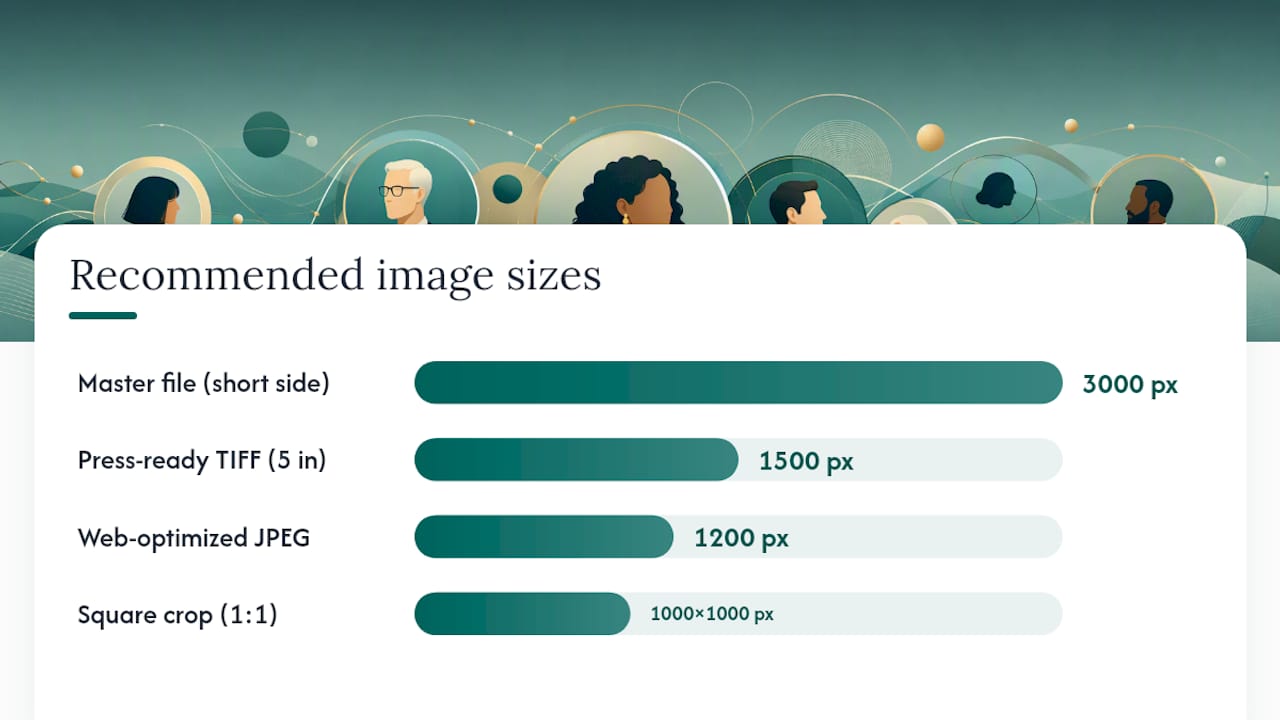
For PR-ready headshot requirements, press outlets typically request a minimum 300 dpi TIFF at 5 inches wide — roughly 1500px — with no watermarks and a clean background. Build that spec into your master deliverable so you’re not scrambling when a journalist requests a photo on deadline.
Leadership headshot sessions typically yield 2–5 final images per person to support different channels, and sessions are refreshed every 1–2 years or after a significant role change.
Board and executive headshot programs cost more than standard employee headshot days, and for good reason: the per-person time is longer, the retouching standard is higher, and the logistics of coordinating senior leaders across multiple locations add real complexity.
The main cost drivers:
Per-person session time. Executive sessions run 20–45 minutes versus 10–15 for a standard employee headshot. That longer window allows for multiple looks, pose adjustments, and the kind of direction that produces a usable image from a reluctant subject.
Travel and location fees. On-site shoots at a single office are the most cost-efficient. Multi-location programs — a board spread across New York, San Francisco, and Miami, for example — require either multiple travel days or a vendor with regional production teams.
Retouching scope. Executive-level retouching is more involved than basic color correction. Budget for natural skin retouching, background cleanup, and consistent color grading across the full set.
Number of final images and licensing. More final selects per person and broader usage rights (perpetual, worldwide, syndication) increase cost. Define this upfront so proposals are comparable.
Rush turnaround. Standard delivery runs five to seven business days. Rush delivery (48–72 hours) typically carries a premium.
When evaluating proposals, ask vendors to break out line items for: pre-production and discovery, shoot day fees (including travel), per-person retouching, number of final images, file delivery, and licensing scope. A proposal that bundles everything into one number makes apples-to-apples comparison impossible.
Organizer and photographer checklist:
Confirmation email to board members (template elements):
Include: date, location with parking/access instructions, their specific time window, expected duration (20–30 minutes), wardrobe guidance summary (solid colors, avoid patterns), and a note that a makeup artist will be available. Keep it to five bullet points — board members will not read a long email.
Short intake form elements:
Mobile studio setups and brief on-site sessions can produce a consistent look across board members while minimizing travel and downtime — the intake form is what makes that efficiency possible by eliminating back-and-forth after delivery.
The clearest way to evaluate a vendor is to understand exactly how they run a program from first call to final file delivery. Here’s how a national provider like studio2U approaches a board headshot engagement.
Discovery and brand alignment. The process starts with a stakeholder interview — typically 30–45 minutes with the communications lead or CMO. The goal is understanding the organization’s visual identity, the primary use cases for the images, and any governance or privacy constraints. From that conversation, the production team builds a moodboard and a deliverable spec that gets approved before a single camera is unpacked. This step is where identity and narrative work informs the visual brief — the headshot style should reflect how the organization wants leadership to be perceived, not just what looks good in isolation.
On-site logistics. studio2U brings a portable studio directly to the client’s office, eliminating the coordination burden of getting board members to an external location. Setup takes roughly 60–90 minutes before the first session. Each board member gets a 20–30 minute slot. For multi-site boards, production teams travel to each location using standardized equipment so the lighting and background are identical in New York and San Francisco. A backup schedule accounts for late arrivals and cancellations without derailing the day.
Retouching and delivery. Post-production follows a standardized workflow: natural skin retouching, consistent color grading across the full set, background cleanup, and delivery in all agreed crop ratios. Turnaround is five business days as a standard. Files are delivered with a consistent naming convention (LastName_FirstName_CropType_Year) and stored in a shared folder with access controls. The production team provides a style guide document so future photographers can match the look when individual members are added or refreshed.
Update cadence. studio2U recommends scheduling a refresh every 18–24 months or whenever a new board member joins. Keeping a standing brief on file means the next session requires no discovery work — the photographer arrives with the spec already locked.
The most common failure isn’t a bad photo. It’s a good photo that doesn’t match the others. One board member submits a LinkedIn selfie. Another has a headshot from a conference three years ago with a different background. A third has a high-quality portrait, but it’s shot in black and white while everyone else is in color. The governance page ends up looking like a collage rather than a leadership team.
The fix is simpler than most teams expect: standardize one background, one crop, and one lighting style before anyone picks up a camera. That single decision eliminates most of the visual drift that accumulates over time. A written style guide — even a one-page document with a reference image and a spec sheet — gives future photographers enough to match the existing set when new members join.
The second most common mistake is treating retouching as an afterthought. Executive-level retouching is not about making people look younger or thinner. It’s about removing the distractions — a temporary blemish, an uneven color cast, a stray hair — that pull the viewer’s eye away from the face. The standard should be “natural and consistent,” not “heavy” or “minimal.” Define it in the brief so the retoucher isn’t guessing.
One non-obvious shortcut: ask the retoucher to color-grade all images in the set together rather than individually. Grading each photo in isolation produces subtle variations in skin tone and background color that are invisible in a single image but obvious when the full board is displayed side by side on a governance page. Batch grading takes the same amount of time and produces a noticeably more cohesive result.
Board headshot programs require more than a photographer with a good camera. They require a production workflow built for senior leaders: portable studio equipment, standardized lighting, fast retouching, and a delivery process that meets governance and press requirements without creating extra work for your communications team.

studio2U brings the studio to your office, runs each board member through a 20–30 minute session, and delivers retouched files in every crop ratio you need within five business days. The same portable setup travels to multiple office locations, so a board spread across several cities gets identical results without anyone leaving their building. Every program includes a style guide document so future sessions match the existing set.
To get an accurate quote quickly, share: the number of board members, their locations, your primary use cases (governance page, investor deck, press), and your target delivery date. Studio2uheadshots and a production coordinator will respond within one business day.
The sources below support procurement decisions, design briefs, and internal justifications for board headshot programs.
Board headshots are typically shot against a neutral background with consistent, professional lighting — modern versions favor warmer tones and natural expressions over the stiff, unsmiling portraits common a decade ago. The goal is a look that reads as authoritative and approachable simultaneously, suitable for governance pages, investor decks, and press materials.
A slight, natural smile with relaxed eyes reads as both competent and approachable — more effective than a neutral stare or a forced grin. The expression should feel like the beginning of a conversation, not a passport photo.
Avoid busy patterns (fine stripes, houndstooth, plaid), logos, and very light colors like white or cream, which can wash out against light backgrounds. Solid mid-tones — navy, charcoal, deep burgundy, forest green — photograph consistently well and keep the focus on the face.
AI-generated headshots can produce a plausible result for individual use, but they cannot replicate the consistency, lighting control, and governance-grade quality a professional program delivers across a full board. For investor materials, press releases, and annual reports, the risk of an AI image that looks subtly off outweighs any cost savings.
Every 1–2 years is the standard refresh cadence, with additional updates whenever a new member joins, a significant role change occurs, or the organization rebrands. studio2U keeps a style guide on file for every board program so refresh sessions require no new discovery work.
