10–14 Assets From One Session: Event Content Repurposing for Marketers
%20(1)%201.png)
.png)
.png)
September 18, 2026
%20(1).jpg)

To host a Tech Week event that fills the room and outlives the night, submit through the official host form with a Partiful listing built on the Tech Week template, book your photo and video capture before you confirm catering, and promote the event yourself instead of waiting on the official calendar to do it for you. Set turnaround expectations with your crew now, because the content you capture in a three-hour window is what fuels your LinkedIn, email, and sponsor reporting for the next quarter.
TL;DR:
- Hosts should lock their venue, confirm target audiences, and book content capture teams at least four weeks before the event to ensure quality and timely delivery.
- Planning camera shots and prioritizing key deliverables such as hero images and speaker clips from the start reduces post-event workload and enhances content usefulness.
- During load-in, verify power, lighting, sound, and sponsor exposures quickly, and assign a dedicated social lead to ensure immediate posting of key moments.
- For hybrid events, test all technical equipment and internet connections beforehand and record locally to safeguard against live stream issues.
- Sending sponsor deliverables within a week and analyzing engagement metrics afterward increases sponsorship retention and informs future event planning.
Tech Week runs as a decentralized series. Hundreds of individual events, hackathons, panels, happy hours, and demos, happen across a single host city in one week, each one organized by a different company, startup, or VC. Nobody is running this for you. That reality should shape every decision below.
Submission (do this first): Fill out the official host form and set up your event page on Partiful using the required Tech Week template, complete with your city hashtag. Tech Week charges no fee to host, and approved listings land on the calendar that reached over 100,000 attendees in 2025.
6 to 8 weeks out:
2 to 3 weeks out:
Day-of:
The mistake most hosts make is treating photography as an afterthought booked the week before. Host HQ’s own guidance is explicit: plan your capture strategy from the beginning, because a recap video and a handful of speaker clips are what stretch a two-hour event into two months of content.
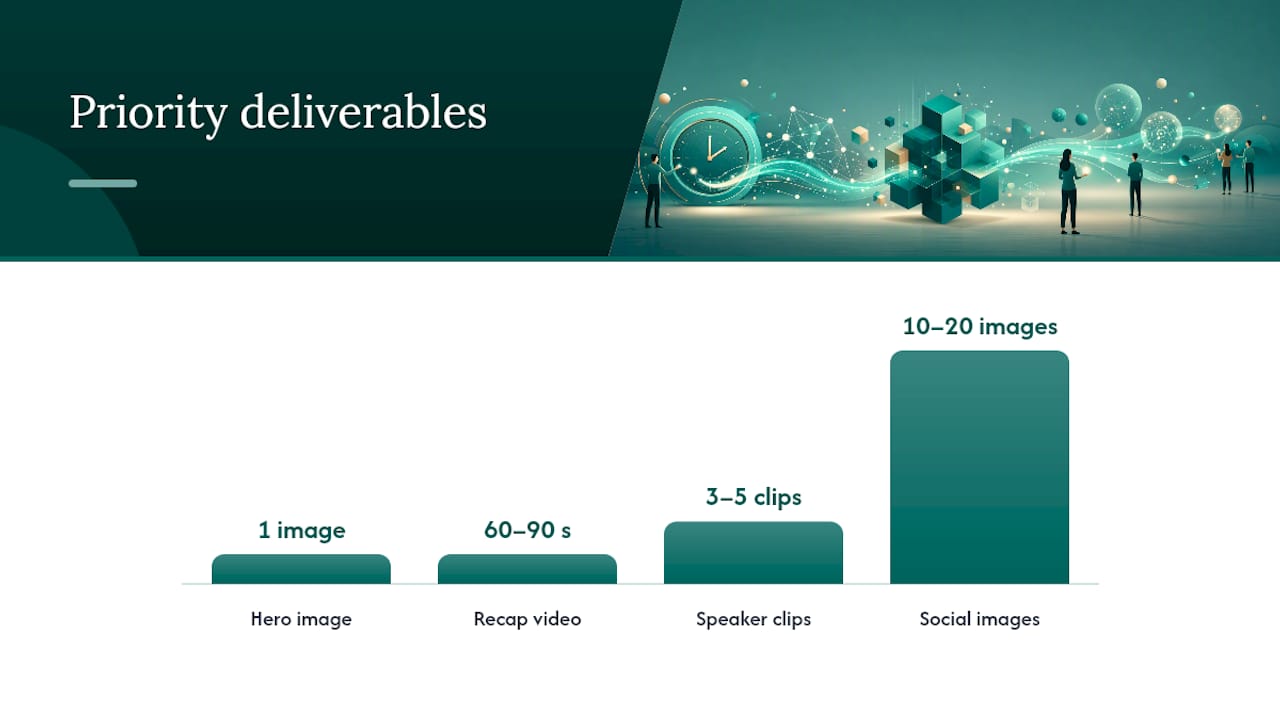
Start by naming three to five priority deliverables before you book anyone:
Crew size should match those goals, not the other way around. A single roaming shooter covers a small happy hour fine. A panel with sponsors and a headshot line usually needs a roaming shooter plus a dedicated interview or headshot station, which studio2U’s own coverage model treats as the efficient default for short-format events: one person catches candid networking energy, the other locks down controlled speaker and sponsor assets.
Set turnaround windows and file formats before the event, not after. Sponsors especially expect specific deliverables: logoed b-roll, individual speaker portraits, and a short testimonial clip they can drop into their own reporting. Agree on those formats in writing.
Pro Tip: Give your crew a one-page shot list ranked by priority, not a wish list. If the event runs long or short, they’ll know exactly what to sacrifice first.
Most Tech Week venues give you a narrow load-in window, sometimes 45 minutes, so your setup checklist has to be tight.
For headshot activations, keep the flow simple: a backdrop, one light setup, and a runner moving people through in under two minutes each. That pace matters more than styling perfection.
Pro Tip: Have your editor flag hero shots and cut a 30 to 60 second clip on-site or same-night. Publishing while people are still talking about the event beats a polished edit that lands two weeks late.
The official calendar is discovery, not turnout. Host HQ says plainly that organizers are responsible for filling the room; the calendar validates your event, it doesn’t fill it.
Set up your Partiful page with the Tech Week template and city hashtag, and treat that page as your single source of truth. The calendar syncs to it, so any change you make on Partiful ripples out automatically.
Free Tech Week events often experience high no-show rates, commonly between half and over two-thirds of registered guests. Plan around that number, not against it. Host HQ recommends approving guests at roughly two to three times your actual room capacity if you want a full room at start time. Waitlists and screening questions help you manage who actually shows.
The content you captured is only as valuable as how fast and how often you deploy it.
Name your files and tag your metadata as you go. A rights checklist noting who can reuse what, and where, saves real time when a sponsor asks for a specific clip six weeks later.
| Week | Asset | Platform |
|---|---|---|
| Week 1 | Hero image + recap video | LinkedIn, website |
| Week 2 | Speaker clip 1 | Instagram, X |
| Week 3 | Sponsor gallery | Email to sponsor |
| Week 4 | Speaker clip 2 + testimonial | LinkedIn, newsletter |
Sponsors don’t need a dashboard. They need proof the room was full and the content moved.
Package all of it into a single one-page sponsor report: a few images, a short clip link, and three or four top-line numbers. Fast delivery, hero assets within 72 hours, matters more for perceived value than a longer edit ever will. Aim to get the full sponsor packet out within 7 to 14 days of the event.
Most Tech Week budgets get eaten by venue and catering before content ever gets a line item, and that’s backwards. A $2,000 happy hour with no professional capture produces zero reusable marketing assets. The same $2,000 event with a booked photographer produces a gallery, a recap clip, and speaker content worth running for two months.
Build your budget in three buckets: venue and logistics, speaker and sponsor hosting costs, and content capture. Content capture should never be the leftover line item, because it’s the only spend that keeps generating value after the room empties.
Scale crew size to your format. A 20-person founder dinner needs less than a 150-person panel with sponsor activations. If you’re running a recurring series across multiple cities or quarters, a standing arrangement with one production partner keeps quality and pricing consistent instead of rebooking cold each time.
Resource allocation also means staffing your own team correctly: someone owns Partiful and RSVPs, someone owns day-of run-of-show, and someone owns social publishing in the 72 hours after. Splitting those roles across three people, even informally, prevents the common failure where great content gets captured and then sits unpublished for three weeks because nobody owned that step.
Sponsors fund Tech Week events expecting visibility, not just a logo on a slide. That means their deliverables need to be part of your plan from day one, not an afterthought you scramble to produce after they ask.
Ask sponsors directly what they need before the event: logoed b-roll, individual portraits of their team at the event, a short testimonial clip, or specific photos of their branded activation. Build those into your shot list so your crew captures them without disrupting the flow of the event itself.
Co-hosting with a partner organization, another startup, a VC firm, or an accelerator, multiplies your promotional reach because each partner brings their own list and channels. It also splits the cost of production, venue, and staffing, which matters when you’re running multiple events across a busy Tech Week calendar.
Deliver sponsor assets fast. A sponsor who gets their gallery and clip within a week is far more likely to sponsor your next event than one who’s still waiting a month later. That turnaround, more than the event itself, is often what determines whether a sponsor relationship becomes recurring.
Speakers say yes to Tech Week events for exposure, not appearance fees, which means your pitch needs to sell the platform, not the paycheck. Be specific about audience size, format, and what content they’ll walk away with, since a well-produced speaker clip they can post themselves is often more compelling to a busy founder or investor than the invitation alone.
Confirm speakers in writing at least six to eight weeks out, and give them a short brief covering format, timing, and any talking points you want covered. Panelists especially benefit from a five-minute pre-panel conversation with your moderator so the on-stage dynamic doesn’t feel like strangers meeting for the first time.
Promise speaker clips as part of the deal, not a bonus. A three to five minute cut of their best moment, delivered within days, gives them something to share with their own network, which extends your event’s reach well past the room you actually filled.
Panels alone don’t create memorable events. The conversations that happen in the hallway after the panel are usually what attendees remember and what your content should prioritize.
Structure format matters. A single 45-minute panel followed by 90 minutes of open networking generates far more usable content, and far more genuine connection, than three back-to-back panels with no breathing room. Build in a specific networking prompt or icebreaker if your crowd tends to cluster in existing circles rather than meet new people.
Headshot activations double as engagement tools. Attendees line up, chat while waiting, and walk away with something tangible, a professional photo, that gives them a reason to remember your event specifically. It’s a small addition that pays off in both content and goodwill.
Give your social lead permission to approach people mid-conversation for quick interview soundbites. The best founder and attendee quotes usually come from those unplanned, thirty-second moments, not from a formal sit-down interview scheduled in advance.
The data you collect after one event should directly shape how you plan the next one. Compare your RSVP number against actual attendance to calibrate your over-invite ratio more precisely next time. If you approved three times capacity and still had an empty room, adjust that multiplier down; if you sold out and turned people away, adjust it up.
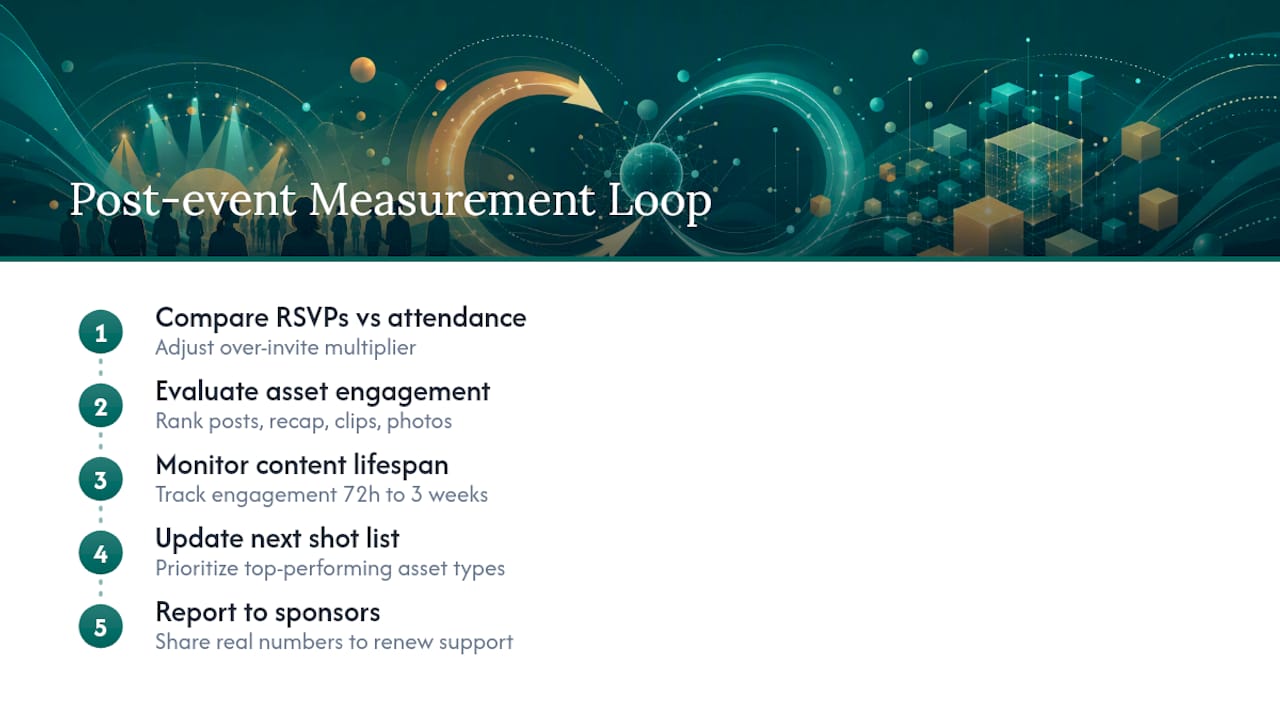
Track which social posts, the recap video, a specific speaker clip, a candid photo, drove the most engagement. That tells you what to prioritize in your next shot list rather than guessing based on what felt good in the room.
Watch how long your content stays active. If speaker clips are still getting shares three weeks out, that’s a signal to slow your publishing cadence and stretch the content further. If engagement drops off after 72 hours, front-load your best assets and publish faster next time.
Feed all of this back into your sponsor conversations too. A sponsor who sees real numbers, not just nice photos, tied to their previous event is far easier to bring back for the next one.
Hybrid Tech Week events add a layer of risk that in-person-only events don’t have: a stream that drops mid-panel is worse than no stream at all. Test your full setup, camera, audio, and internet connection, at the actual venue at least a day ahead, not just at your office.
Have a backup internet connection ready, whether that’s a second hardwired line or a cellular hotspot, since venue Wi-Fi during a busy Tech Week week is often shared across multiple simultaneous events. Assign one person solely to monitor the stream during the event so a technical issue gets caught in seconds, not discovered by an attendee commenting online.
Audio matters more than video quality for hybrid formats. A clean lapel mic on your speaker, with a backup mic ready, prevents the single most common complaint from remote attendees. Record locally on the camera even while streaming, so a dropped connection doesn’t cost you your only copy of the panel for later editing into speaker clips.
The hosts who get the most out of Tech Week don’t think about content last. They decide what they need, the recap video, the speaker clips, the sponsor shots, before they book a venue, then build their crew and shot list around those deliverables. That single shift in sequence changes everything downstream: crew size, turnaround expectations, even how the event itself gets structured. Skip that step, and you’ll walk away from a great event with nothing but a phone full of blurry photos.
— Kevin
Booking a photographer the week of your event usually means whoever’s available, not whoever fits your format. The company offers on-location coverage designed for panels, happy hours, and founder dinners, typically employing a two-person team: one roaming shooter and one interview or headshot station, to capture both candid networking and controlled speaker and sponsor assets.

Packages are built around the realities of Tech Week timing. Fast gallery turnaround means your hero image and social shots go out while the event is still trending, not two weeks later. The Networking, Summit, and Conference packages scale to your format, from a compact happy hour to a full multi-panel conference, and each one includes the highlight video and speaker clip cuts your marketing team needs for the next 90 days. If your event includes a headshot line, the START UP package covers quick mini-sessions without slowing down your networking flow.
If you’re locking your Tech Week date and want your content plan set before you finalize the venue, reach out to studio2U to scope crew size and turnaround against your actual run-of-show.
It can be, mainly because turnout and content both depend entirely on the host, not on the official calendar. That stress drops significantly once you lock your Partiful setup, your crew, and your promotion calendar weeks in advance instead of scrambling in the final days.
Tech Week programming varies by city and changes year to year, since each event is independently organized by a different company, startup, or VC rather than centrally planned. The most current listings for any specific city and date live on the official Tech Week calendar, which updates as hosts submit approved events.
Expect a mix of panels, hackathons, founder dinners, happy hours, product launches, and demo days, all running independently across the host city in the same week. Hundreds of these events typically occur during a single Tech Week, which is exactly why strong promotion and fast content turnaround matter for standing out.
Submit your event through the official host form; there’s no fee to host, and approved events can receive calendar visibility and amplification. Your Partiful listing, built on the required Tech Week template, needs to be live and accurate before you submit, since the calendar syncs directly to it.
studio2U’s Networking and Summit packages start at listed prices on the conferences page, scaled to event size and format. Exact package pricing and inclusions are available on request through studio2U directly.
