Ten Point Contract Checklist for Headshot Rights, U.S. Businesses
%20(1)%201.png)
.png)
.png)
September 1, 2026
%20(1).jpg)

Send two emails: a detailed prep message one week out, and a three-line reminder the morning of. The one-week email needs the date, start time, room location, point person’s contact, expected time per person, a wardrobe note, and what to bring. The morning-of message needs only three things: where to go, what time to arrive, and what to bring for touch-ups.
TL;DR:
- Sending a separate one-week pre-event email with detailed information improves attendance and preparation, especially when it highlights time, location, and attire clearly.
- The morning-of reminder, limited to three lines, reinforces the essential details for late or skimming employees, minimizing missed appointments.
- Proper scheduling, including buffer periods and longer sessions for executives, prevents delays and helps keep the headshot day on time.
- Consistent wardrobe guidance and a designated point person for the day streamline operations and reduce last-minute questions or chaos.
- Using a split communication strategy—one detailed email early and a brief reminder on the day—avoids the common scheduling pitfalls that cause headshot day delays.
The one-week email is the one employees actually read, so front-load the details that answer “do I need to do anything?” A subject line like “Your Headshot Slot: [Date] at [Time]” or “Action Needed: Headshot Day Prep” gets opened faster than a vague “Headshot Day Info” line, because it tells people immediately whether it applies to them.
Open with the appointment itself, not a preamble. “You’re scheduled for a headshot on [Date] at [Time] in [Room/Location]” should be the first sentence people see, not the third paragraph.
From there, structure the body into five scannable chunks:
Bold the time and location so they jump out on a phone screen. Keep the whole email under a 30 second read. If your session includes usage terms for the final photos, a brief line on employee headshot policy expectations avoids confused replies later, and a short note on file formats saves a round of follow-up questions about headshot cropping for web use.
This message exists to catch the people who skimmed the first email or forgot it entirely. It works because it asks for nothing beyond a glance.
Three lines, no more:
Send it the morning of, and if your first slots start early, send it 60 to 90 minutes before the day begins so early arrivals actually see it before they’re already sitting down. PhotoDay’s reminder system times automated messages by timezone rather than a fixed clock, which is worth copying even if you’re sending manually. Some teams add a same-morning text for anyone who hasn’t opened email by 8 AM.
Pro Tip: Send a plain-text version alongside any styled HTML email. Some corporate inboxes strip formatting, and a plain-text fallback with a phone number guarantees the message still reads clearly.
Slot length is where most headshot days go sideways. Book too tight and one slow subject cascades into delays by lunch.
Fixed calendar invites beat an open sign up window almost every time, because a named slot with a decline button surfaces no-shows before they become gaps in the queue. Reserve the room, clear a staging area nearby, set up a mirror, print the schedule, and post simple signage pointing people to check-in. Reviewing corporate headshot guidelines before you finalize the room layout catches most of the setup mistakes early.
Wardrobe questions generate more employee emails than anything else about headshot day, so answer them before anyone has to ask.
Full detail lives in corporate headshot attire guidance, which is worth linking directly in the prep email rather than retyping it every year.
One person should own the flow of the day, full stop. Splitting that responsibility across two or three people is how slots get double booked and no-shows go unnoticed.
That point person’s job breaks down into a few repeatable steps:
Pro Tip: Give the point person and the photographer a direct phone line to each other, separate from the general office line. It’s the fastest way to reassign a late arrival’s slot without stopping the queue.
When someone’s late, don’t hold the line for them. Slot them into a later opening and keep moving. A single phone contact between point person and photographer means that reshuffling happens in seconds, not through a chain of texts.
Subject lines first. For the one-week email, try “Your Headshot Slot: [Date] at [Time]” (formal), “Heads Up: Headshot Day Prep Info” (casual), or “Action Needed: Confirm Your Headshot Time” (urgent). For the morning-of note, “Reminder: Headshots Today at [Time]” covers it.
One-week template:
Morning-of template: “Reminder: your headshot is today at [Time] in [Room/Location]. Arrive 5 minutes early and bring a touch-up kit if needed.”
Tokens like [FirstName] or [OrganizationName] auto-populate cleanly if your email platform supports mail merge, a feature HeadshotPro’s enterprise tools build directly into team communications. Send both as plain text with an HTML version attached, and always list a phone number as a backup contact for anyone who can’t access email that morning.
Every recommendation above traces back to what actually breaks headshot days in practice. Studio2U’s crews arrive 60 to 90 minutes before the first subject specifically because lighting tests and a stand-in frame can’t be rushed, and skipping that window is what turns a smooth morning into a backed-up hallway by 11 AM.
The portable studio setup exists to cut that setup time further; no need to clear a full conference room when a compact rig fits in a corner. Edited assets come back on a standard five-day turnaround, fast enough that HR isn’t fielding “where are my photos” emails three weeks later. Consistent wardrobe guidance and retouching standards across every session, whether it’s company-wide headshots or a single new hire, keep the whole team’s photos looking like they belong on the same website.
Most of the advice floating around about headshot day communication focuses on tone: friendly reminders, motivational framing, “get excited for headshots!” energy. None of that moves the needle. What actually determines whether your day runs on schedule is whether people show up on time knowing what to wear, and that comes down to information architecture, not enthusiasm.
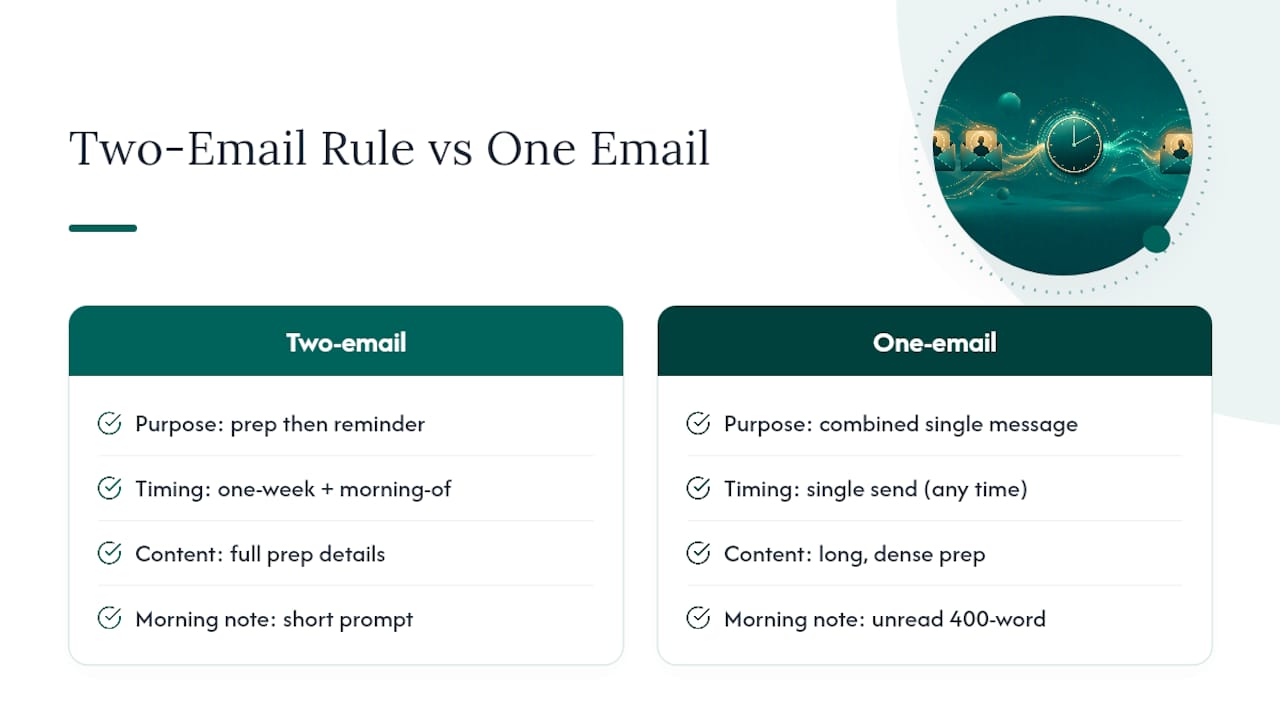
The mistake I see most often is HR sending one long email and calling it done. A single message tries to do two jobs at once: give employees everything they need to prepare, and remind them the morning of. Those are different tasks with different attention spans behind them. Nobody rereads a 400-word email at 8 AM before their 9:15 slot.
Split the job. The one-week email does the heavy lifting: wardrobe, timing, location, expectations. The morning-of message does one thing: get people physically to the right room at the right time. Trying to combine them, or worse, skipping the morning reminder entirely because “we already told them,” is the single most common reason headshot days run behind schedule. Prioritize the split before you worry about template design or subject-line wording. The structure matters more than the polish.
— Kevin
If coordinating slots, chasing wardrobe compliance, and hoping the point person catches every no-show sounds like more than your week has room for, Studio2U runs the entire day for you, on-site, with a national team that’s done this in offices from Boston to the Bay Area.

Studio2U brings a portable studio directly to your office, keeps setup disruption to a minimum, and delivers retouched, ready-to-use images on a five-day turnaround. When you request a quote, have your team size, a few preferred dates, and your room availability ready. That’s enough for Studio2U to build a schedule that fits your office instead of the other way around. Start by visiting Studio2U to check dates for your team.
Further reading: PhotoDay’s automated campaign docs for reminder timing, PhotoDay’s communication guide for multi-channel outreach, Strawberry Kit’s editable templates, and JFPhotos’ HR checklist for briefing best practices.
The best direction is short and specific: relaxed shoulders, chin slightly forward, a natural half-smile. Overly technical posing instructions tend to make people stiffer, not more relaxed.
Rates vary widely by market and package structure, so a flat hourly figure isn’t a reliable benchmark. Corporate headshot sessions are usually priced per person or per team size rather than by the hour, which is how Studio2U structures its packages.
Definitions vary depending on the source, and this rule isn’t standard terminology for corporate headshot planning. Focus instead on the two-email structure and time-per-person guidance covered above, which has direct support from HR checklists in the field.
Attach files in the format your team actually uses (web-ready JPEGs for most staff directories) and include a one-line note on approved usage per your headshot policy. Avoid oversized attachments; a shared folder link works better for teams larger than a handful of people.
Email works for most teams, but a same-morning text catches people who haven’t opened their inbox yet, especially for early first slots. PhotoDay’s own messaging setup treats SMS as a secondary channel for exactly this reason, not a replacement for the main reminder.
